
BIMI Setup Guide: SVG Logos, VMCs & DMARC Prerequisites
BIMI setup from DMARC enforcement to verified logos: building an SVG Tiny PS file, choosing a VMC or CMC, publishing the record and which inboxes display it.
DKIM Setup Guide: Selectors, Keys & DNS Records
Set up DKIM correctly: how selectors and the _domainkey DNS record work, 2048-bit keys, canonicalization and dual-selector rotation.
DMARC Setup Guide: Records, Policies & Rollout
Publish DMARC the right way: tag syntax (p, sp, pct, rua, adkim), alignment rules, external report authorization and the staged none-quarantine-reject rollout.
Email Authentication: SPF, DKIM & DMARC Setup in the Right Order
Email authentication is no longer optional. Since February 2024, Gmail and Yahoo require SPF, DKIM and DMARC for every sender delivering more than 5,000 messages per day to their users, and Microsoft has followed with similar requirements for bulk senders to Outlook.com. Domains that skip any of the three lose inbox placement, and domains that configure them in the wrong order block their own legitimate mail.
This guide walks through what each protocol does, the setup order that avoids outages, and how to verify each record with free tools.
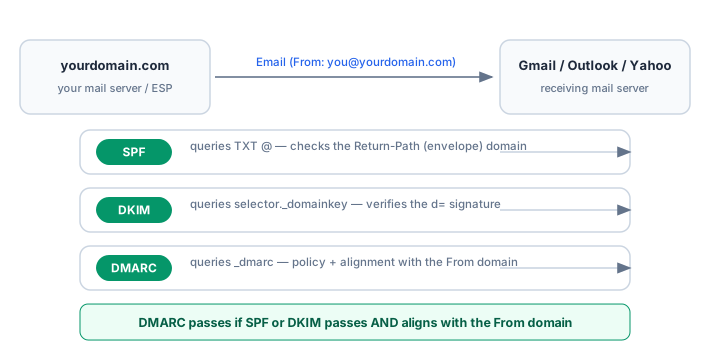
What each protocol actually does
The three protocols answer three different questions a receiving server asks about every message:
- SPF answers is this server allowed to send for this domain? It is a DNS TXT record listing authorized IP addresses and include domains.
- DKIM answers was this message altered in transit, and is it really from who it claims? It adds a cryptographic signature the receiver can verify against a public key in DNS.
- DMARC answers what should the receiver do when SPF or DKIM fails? It also requires alignment: the domain that passed SPF or DKIM must match the visible From domain, which is what defeats direct spoofing.
A common misconception is that SPF alone prevents spoofing. It does not. SPF validates the envelope sender (Return-Path), which an attacker controls independently of the visible From header. Only DMARC alignment ties the check to the domain the recipient actually sees.
The correct setup order
The order matters because DMARC evaluates SPF and DKIM. Publishing an enforcement policy before both foundations are clean rejects your own mail. Follow this sequence:
- Inventory every sender. List every service that sends mail as your domain: mail server, CRM, marketing platform, help desk, billing system, website forms, printers. Missing senders are the number one cause of DMARC failures.
- Publish one SPF record covering all of them.
- Enable DKIM in each sending service and publish the keys.
- Publish DMARC with p=none and a rua report address, then monitor for 2–4 weeks.
- Escalate to quarantine, then reject once reports show all legitimate mail passing.
Step 1: SPF
The SPF record is a single TXT record at the root of your domain. A typical multi-sender setup:
v=spf1 include:_spf.google.com include:mailgun.org ip4:203.0.113.10 ~allThree rules that break most records:
- Only one SPF record per domain. Two TXT records starting with v=spf1 cause a permanent failure. Merge additional includes into the single record.
- Maximum 10 DNS lookups. Every
include,a,mx,redirectorptrmechanism costs a lookup, and nested includes count too. Exceed 10 and the whole record fails withpermerror, which receivers treat as no SPF at all. See SPF flattening if you are close to the limit. - End with
~allwhile validating, then move to-allonce DMARC reports confirm coverage.
Verify the record with the SPF Checker — it parses mechanisms, counts lookups and flags syntax errors. To build a record from scratch, use the SPF Generator.
Step 2: DKIM
DKIM is enabled per sending service, not per domain. In each provider's admin console, enable DKIM signing for your domain and publish the DNS records it gives you — usually either a TXT record at <selector>._domainkey.yourdomain.com containing the public key, or a CNAME pointing at the provider's key.
What to check:
- Use 2048-bit keys. 1024-bit keys still verify in most places but are considered weak and are rejected by some receivers.
- The d= domain must be your domain (relaxed alignment allows a subdomain). If your provider signs with its own domain, DMARC alignment fails even though DKIM passes — this is the single most common DMARC failure.
- Rotate keys periodically; annual rotation is a reasonable default.
Verify with the DKIM Checker by entering your domain and the selector your provider uses.
Step 3: DMARC
The DMARC record is a TXT record at _dmarc.yourdomain.com. A safe starting policy:
v=DMARC1; p=none; rua=mailto:dmarc-reports@yourdomain.com; fo=1With p=none nothing is blocked — receivers only send daily aggregate reports to your rua address. Those reports list every source sending as your domain, which IP passed or failed SPF and DKIM, and whether DMARC aligned. Read them with the DMARC Report Analyzer.
Escalate only when every legitimate source passes:
p=none— monitor, fix failing legitimate senders (2–4 weeks).p=quarantine; pct=25— apply spam-foldering to 25% of failing mail, then raise pct gradually.p=reject— block failing mail outright.
Jumping straight to p=reject before reading a single report is how companies lose their own invoices to spam folders. Generate a record with the DMARC Generator.
How to verify the whole stack
After publishing, send a test message to a Gmail account and open Show original. You are looking for three lines:
SPF:    PASS with IP 203.0.113.10
DKIM:   'PASS' with domain yourdomain.com
DMARC:  'PASS'
If SPF and DKIM both show PASS but DMARC shows FAIL, you have an alignment problem — the domains that passed do not match your From domain. Diagnose it in the DMARC failure troubleshooting guide.
For a domain-wide check across all records at once, run the Email Health Check or the full Email Deliverability Test.
Provider-specific setup guides
The generic flow above covers every provider, but the console paths and record values differ. If your mailbox or sending platform is on this list, its dedicated guide saves you a round of guessing:
- Mailboxes: Google Workspace, Microsoft 365, Zoho Mail, Proton Mail, iCloud+, Fastmail
- Chinese enterprise mail: Tencent Exmail, Alibaba Mail, NetEase Enterprise Mail, Feishu Mail, Huawei Cloud Mail, 263 Mail, Sina Enterprise Mail, Coremail
- Chinese sending platforms: SendCloud, Aliyun DirectMail, Tencent Cloud SES — or see the China provider comparison to pick between them
- Sending platforms: Amazon SES, SendGrid, Mailgun, SparkPost, Mailjet, MailerLite, Shopify
- DNS panels: Cloudflare, GoDaddy, Namecheap, OVHcloud, cPanel
- Self-hosted: Postfix, Zimbra, Roundcube
Frequently asked questions
Do I need all three protocols?
For any domain sending its own mail, yes. SPF alone breaks under forwarding, DKIM alone tells receivers nothing about what to do with failures, and DMARC without SPF and DKIM has nothing to evaluate. Since 2024 the large providers treat all three as the baseline for bulk senders.
Can DMARC pass when SPF fails?
Yes. DMARC passes when either SPF or DKIM passes and aligns with the From domain. Forwarded mail often breaks SPF while a valid DKIM signature survives, which is exactly why DKIM matters.
How long does DNS propagation take?
Most record changes are visible within minutes, but allow up to 24–48 hours for full propagation. TTL values below one hour make iteration much faster while you are still testing.
What changed with Gmail and Yahoo in 2024?
Both now require SPF and DKIM alignment plus DMARC records for bulk senders (5,000+ messages/day to their users), enforce one-click unsubscribe (RFC 8058) for commercial mail, and keep complaint rates below 0.3%. See the Gmail and Yahoo sender requirements guide for details.
Related Tools
Need Help?
Our tools are designed to be intuitive, but if you need assistance, we're here to help.
About Our Tools
Professional-grade email and DNS diagnostic tools trusted by IT professionals worldwide.