
ARC (Authenticated Received Chain): What It Is and When You Need It
ARC (RFC 8617) is not another authentication method. How forwarders seal original SPF/DKIM results, how the chain works, and when you need it.
Email Blacklist Removal Guide: How to Check Your IP and Request Delisting
Check your sending IP against major email blocklists and request delisting from Spamhaus, Microsoft Outlook, Barracuda and SpamEatingMonkey, with official portals, request templates and a post-removal verification checklist.
Email Bounce Codes Explained: SMTP 4xx & 5xx
SMTP bounce codes explained: permanent 5xx vs temporary 4xx failures, what codes like 5.7.1, 5.7.26 and 4.7.1 mean, and how to fix each one.
How to Fix DMARC Failures: Alignment, Headers & Reports
A DMARC failure means one thing: neither SPF nor DKIM produced a passing result aligned with the visible From domain. Everything else is about finding which one broke and which of four root causes you face.
If DMARC is not yet rolled out, start with the DMARC setup guide; this page assumes a record exists and mail is failing.
Get the diagnosis right
The most common misread is "pass but not aligned." You open the headers, see spf=pass and dkim=pass, and conclude DMARC cannot be the problem. But SPF checked the envelope domain (Return-Path) and DKIM verified a signature by d= — if both are your ESP's domain, DMARC still fails. A pass on the wrong domain is a failure for DMARC.
So the question is never "did SPF pass?" but "did SPF pass on a domain that aligns with From?" Same for DKIM.
Step 1: get the original headers
In Gmail, open the message, click the three-dot menu and choose Show original; in Outlook, use the message source view — you need the raw header block itself. Paste it into the Email Header Analyzer for a structured view.
Step 2: read the Authentication-Results header
The receiver records what it checked and how. A failing message typically looks like:
Authentication-Results: mx.example.com;
   spf=pass smtp.mailfrom=sendgrid.net;
   dkim=pass header.d=sendgrid.net;
   dmarc=fail (p=quarantine dis=quarantine) header.from=yourdomain.com
Three parts:
- spf= — the SPF verdict, and critically
smtp.mailfrom=, the envelope domain checked. - dkim= — the DKIM verdict, and critically
header.d=, the signing domain. - dmarc= — the overall verdict, and
header.from=, the domain alignment is measured against.
Compare domains: is smtp.mailfrom= in the same organizational domain as header.from=? Is header.d=? In the example, both checks passed — but on sendgrid.net, not yourdomain.com. Unaligned, DMARC fails: the "signed with the wrong domain" pattern, root cause (a).
A different pattern tells a different story: spf=fail and dkim=fail on your own domain points to forwarding or an unknown sender; a missing dkim= line means it was never signed. For every header involved, see the email header analysis guide.
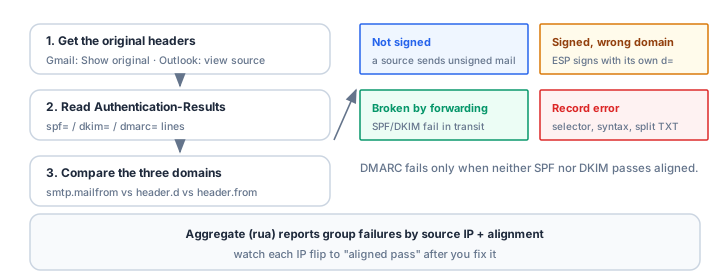
The four root causes and their fixes
(a) Your ESP signs with its own domain
Signature: spf=pass and dkim=pass, but on the provider's domain while header.from is yours.
Fix: enable custom-domain authentication in the provider. Most ESPs can sign DKIM with your domain (publish their selector under <selector>._domainkey.yourdomain.com or a CNAME to their key — see the DKIM guide) and use your Return-Path subdomain for SPF alignment. Either is enough; both is standard. After enabling, re-test: header.d= or smtp.mailfrom= must show your domain.
(b) Forwarding and mailing lists break SPF and DKIM
Signature: the original sender passed everything, but a forwarder or mailing list re-sent the message; SPF fails because the forwarder's IP is not in your record, DKIM fails if the list modified the body or headers.
Fix: nothing to change in your DNS — which is why DMARC passes on either aligned mechanism, and why DKIM that survives forwarding matters. The durable answer is ARC (Authenticated Received Chain), where forwarders seal the original authentication results; see the ARC protocol introduction. If a mailing list is involved, confirm it rewrites the From header (most do), moving the message outside your domain's DMARC scope.
(c) A sender you never inventoried
Signature: spf=fail from an unfamiliar IP, or dkim missing entirely, on mail that is unmistakably yours — a form notification, a CRM sequence, an invoice, a scan from the office copier.
Fix: full sender inventory. Everything that can send SMTP as your domain belongs on the list: mail platform, CRM, marketing, billing, helpdesk, monitoring alerts, printers and scanners, legacy apps. Then bring each into SPF (see the SPF setup guide) and DKIM. The rua reports are the best discovery tool — see below.
(d) The DNS records themselves are wrong
Signature: dkim=fail with "no key for selector" (missing or mistyped selector record), or SPF permerror from a broken record.
Fix: verify each record: SPF with the SPF Checker (watch for two v=spf1 records and lookup overruns), the DKIM selector with the DKIM Checker (must match s= exactly; no stray quotes or truncation from TXT splitting). The TXT Lookup tool shows the raw DNS answer — ground truth when a panel's display disagrees. Provider paths: the DNS provider guide.
Use aggregate reports to find what you cannot see
Headers describe one message; rua reports describe all of them. Receivers send daily XML aggregates listing every message claiming your domain, grouped by source IP with SPF, DKIM and alignment results. Two groupings do most of the work:
- By source IP: every distinct IP sending as your domain; unknowns are forwarders, forgotten systems or spoofers — correlate against your inventory.
- By alignment result: counts of messages where SPF aligned-passed, DKIM aligned-passed, or neither. Watching the "neither" bucket shrink week over week is the real measure of a rollout.
The DMARC Report Analyzer parses the XML and produces these groupings. If none arrive, check the rua address with the DMARC Checker and confirm external-report authorization for cross-domain reports — details in the DMARC setup guide.
Verifying the fix
- Re-send a test through the fixed path — the same ESP, form or device — to a Gmail or Outlook account.
- Confirm the pattern changed:
header.d=yourdomain.comon the DKIM line, orsmtp.mailfrom=on an aligned subdomain, anddmarc=pass. - Watch the next report cycle. In the following days' rua reports, the failing source IP or selector should flip to aligned pass. One clean test is a data point; a week of clean reports is a fix.
- Run the wider checks: the Email Health Check for the domain-level picture, and the Blacklist Checker if failing mail had already landed in spam — failed authentication plus a listed IP compounds the damage.
Common mistakes
- Treating "spf=pass" as proof of innocence. If it passed on the ESP's envelope domain, DMARC still fails. Always check which domain passed, not just the verdict.
- Adding the forwarder's IP to SPF. It cannot work — forwarder IPs change, and the MAIL FROM they present is often their own domain. Forwarding is an ARC problem, not an SPF problem.
- "Fixing" alignment by loosening policy. Dropping to p=none silences complaints but hides the failure; the mail still fails at every receiver that checks.
- Debugging DNS by belief. Panels cache, split and truncate. Verify the record as the world sees it, with TXT lookups, before concluding it is fine.
- Forgetting the copier. Scan-to-email devices and internal apps send unauthenticated SMTP for years until a rollout exposes them. Inventory, then fix.
Frequently asked questions
Why does SPF pass but DMARC fail?
Alignment. SPF validated the envelope sender (Return-Path) — your ESP's or a forwarder's domain, not the From domain the recipient sees. DMARC requires it to match the From domain's organizational domain. Fix with a custom Return-Path or rely on aligned DKIM.
Why does DKIM pass but DMARC fail?
Same reason, different tag: the signature's d= domain is your ESP's, so the pass is not aligned with your From domain. Enable custom-domain signing so d= carries your domain.
Can I fix forwarding by adding the forwarder to SPF?
No. You cannot enumerate every forwarder's IP, and SPF checks the MAIL FROM they present, often their own domain. The mechanism for preserving authentication through intermediaries is ARC.
How long after a fix should DMARC pass?
Minutes for new mail once DNS is correct; older in-flight messages may still fail until they drain. Confirm in the following week's rua reports that the source stays green.
Do I need both SPF and DKIM alignment to pass?
No. DMARC passes when either one passes and aligns. In practice, configure both: SPF dies at the first forwarder and DKIM survives it — they cover each other's failure modes.
Related Tools
Need Help?
Our tools are designed to be intuitive, but if you need assistance, we're here to help.
About Our Tools
Professional-grade email and DNS diagnostic tools trusted by IT professionals worldwide.