
ARC (Authenticated Received Chain): What It Is and When You Need It
ARC (RFC 8617) is not another authentication method. How forwarders seal original SPF/DKIM results, how the chain works, and when you need it.
Email Blacklist Removal Guide: How to Check Your IP and Request Delisting
Check your sending IP against major email blocklists and request delisting from Spamhaus, Microsoft Outlook, Barracuda and SpamEatingMonkey, with official portals, request templates and a post-removal verification checklist.
Email Header Analysis: Reading Received Chains & Auth Results
Learn email header analysis: get raw headers from Gmail or Outlook, read Received chains bottom-up, decode DKIM and Authentication-Results, spot forgery.
Email Bounce Codes Explained: SMTP 4xx & 5xx
A bounced email is not a dead end — it is a structured diagnosis. Every rejection follows the SMTP standard: a three-digit code that says whether the failure is permanent or temporary, plus an enhanced status code that says why. Read both layers and most bounces become a short to-do list.
This guide covers the 5xx/4xx split, the codes you will actually meet, and where the real detail hides inside a non-delivery report (NDR).
What you need
- The full NDR, including everything below the friendly headline.
- Admin access to your sending platform and DNS.
- The free checkers linked below.
Permanent (5xx) vs temporary (4xx)
The first digit is the only triage step that matters. 5xx is permanent: the receiver evaluated the message and rejected it, so an unchanged retry fails identically — and every retry is another failed delivery logged against your reputation. 4xx is temporary: the receiver is busy, greylisting you, or hitting a transient limit, and servers retry automatically on a backoff schedule.
The enhanced code adds the why, as class.subject.detail. In 550 5.7.1, class 5 means permanent, subject 7 means security or policy, and the trailing 1 is the specific result. The first digit decides whether to retry; the subject decides who owns the fix.
The codes you will actually meet
| Code | What it means | What to do |
|---|---|---|
| 550 5.7.1 | Policy rejection — usually an SPF, DKIM or DMARC failure, an untrusted IP, or an explicit block. | Verify authentication. If it passes, check blocklists. |
| 550 5.7.26 | Gmail refused the message as unauthenticated: SPF and DKIM both failed. Common on Microsoft 365 tenants with no SPF or DKIM for the custom domain. | Publish SPF, enable DKIM, then add DMARC — see the authentication guide. |
| 550 5.7.606 | Microsoft 365 banned your sending IP; 5.7.607 follows if problems continue after removal. | Fix the cause, then use the delist portal — see the blacklist guide. |
| 550 5.4.1 / 5.1.1 | Recipient rejected. Exchange Online's edge blocking returns 5.4.1 for invalid addresses; 5.1.1 is the classic "user unknown". | Confirm the address elsewhere; remove it if invalid. |
| 554 5.7.1 | Classified as spam under the receiver's content and reputation policies. | A sender-reputation problem — see the reputation guide. |
| 450 4.7.1 | Greylisting: a temporary rejection of the first attempt from an unfamiliar sender. | Do nothing; automatic retry succeeds within minutes. |
| 451 4.4.2 | Connection timed out or the remote host did not answer. | Wait. Persistent timeouts point to your firewall or routing. |
| 452 4.2.2 | Recipient mailbox full — temporary, not an invalid address. | Retry in a day or two; suppress if it persists for weeks. |
| 550 5.1.3 | Bad address syntax — a typo, stray space or illegal character (some servers return 553). | Fix the address and resend. |
| 552 5.3.4 | Message exceeds the receiver's size limit. | Shrink it or link large attachments. |
One pair is confused constantly: 5.7.26 is Gmail's authentication rejection, while 5.7.606 is Microsoft's IP ban. The first is fixed with DNS records, the second with a delisting request.
How to read the full NDR
The friendly headline is written for end users; the diagnostic section is written for you. In Outlook, expand Diagnostic information for administrators. A typical block:
Diagnostic information for administrators:
Generating server: mail.yourdomain.com
Remote server returned '550 5.7.26 This mail is unauthenticated...
DKIM = did not pass
SPF [yourdomain.com] with ip [203.0.113.10] = did not pass'
Extract three things: the generating server, the remote server that actually rejected, and the enhanced code with its full text. The rejecting system is the authority on why — its words, not the NDR summary, define the problem. When the text is ambiguous, paste the whole NDR into the header analyzer.
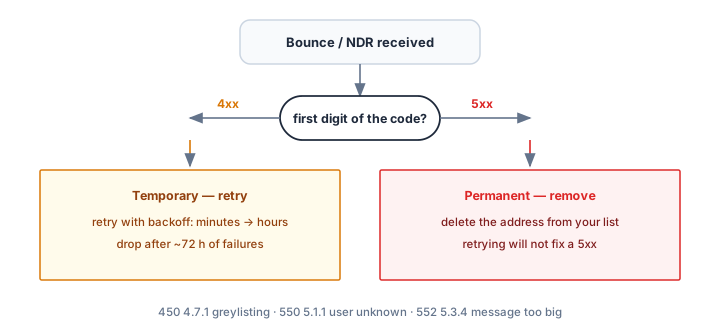
Hard bounces: remove. Soft bounces: retry
- 5.1.x hard bounces (invalid address, syntax) — suppress the address immediately. Repeated sends to invalid recipients damage reputation fast.
- 5.7.x hard bounces (policy, authentication, blocked IP) — keep the recipient, fix the sender. The address is fine.
- 4xx soft bounces — let the server retry for 24–72 hours; suppress only after repeated failures across campaigns.
- Before any large send — pre-screen the list with the Email Verifier.
Verify your fixes
- SPF Checker, DKIM Checker and DMARC Checker — rule out authentication causes.
- Blacklist Checker — rule out IP listings behind 5.7.606 and 550 5.7.1.
- Deliverability Test — full-stack recheck once bounce rates settle.
Common mistakes
- Resending immediately after a 5xx. It fails identically and adds another failure to your record.
- Deleting recipients after one 4xx. Greylisted mail delivers on retry.
- Reading only the headline. The diagnostic section holds the code, the rejecting server and often the fix.
- Treating every 550 alike. 550 with 5.1.x means a bad address; 550 with 5.7.x means a bad sending setup.
Frequently asked questions
Are 4xx bounces ever a problem?
Individually, no — they are normal internet weather. A pattern is: if one domain defers everything for days, or your soft-bounce rate keeps climbing, check network, DNS and reputation throttling.
What is the difference between 550 and 553?
Both are permanent. 550 is the general "mailbox unavailable" refusal; 553 means the mailbox name is not allowed, usually invalid syntax. Handle them the same way: fix or remove the address.
What bounce rate should I stay under?
Keep total bounces below 2% per campaign and hard bounces near zero. Above that, providers factor the failure rate into your sender reputation and future inbox placement.
Related Tools
Need Help?
Our tools are designed to be intuitive, but if you need assistance, we're here to help.
About Our Tools
Professional-grade email and DNS diagnostic tools trusted by IT professionals worldwide.