
BIMI Setup Guide: SVG Logos, VMCs & DMARC Prerequisites
BIMI setup from DMARC enforcement to verified logos: building an SVG Tiny PS file, choosing a VMC or CMC, publishing the record and which inboxes display it.
DKIM Setup Guide: Selectors, Keys & DNS Records
Set up DKIM correctly: how selectors and the _domainkey DNS record work, 2048-bit keys, canonicalization and dual-selector rotation.
DMARC Setup Guide: Records, Policies & Rollout
Publish DMARC the right way: tag syntax (p, sp, pct, rua, adkim), alignment rules, external report authorization and the staged none-quarantine-reject rollout.
Publishing SPF, DKIM & DMARC at Any DNS Provider
SPF, DKIM and DMARC are just DNS records — yet publishing them trips up more people than any other step of email authentication, because every panel asks for the same three things in slightly different words. A record that works in Cloudflare can silently become garbage in Route 53: one panel wants a hostname prefix, the other the full domain name.
This guide gives the universal method — the three fields, TTL, and the hostname trap — then a quick-reference table and the verification step that proves your records are live. For what each protocol does and the order to enable them, read the authentication guide first.
What you need
- Access to the DNS panel that actually serves your domain — check the nameservers first.
- The values from your email provider: the SPF include, DKIM selector and key, DMARC policy.
- The TXT Lookup tool for verification.
The anatomy of a DNS record
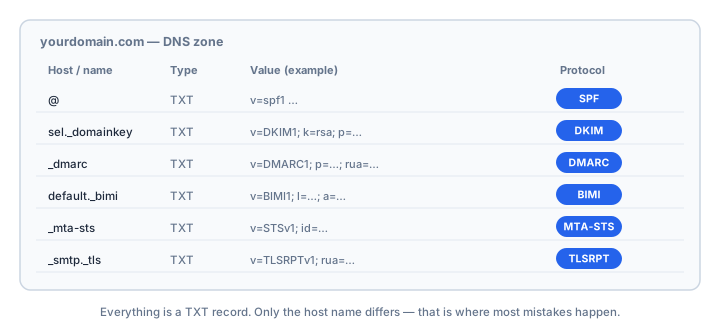
Every panel asks for the same three things: type (TXT for SPF and DMARC; TXT or CNAME for DKIM), hostname (also called Name, Host or Record name), and value (Content, Data or Answer). The hostname is where beginners get burned, because the three records live in three different places:
SPF:     yourdomain.com                      (domain root)
DKIM:    sel2026._domainkey.yourdomain.com   (provider's selector)
DMARC:   _dmarc.yourdomain.com               (fixed _dmarc prefix)
The trap: prefix vs full name. Some panels want only the part before your domain — @ for the root, _dmarc, sel2026._domainkey — and append yourdomain.com themselves. Others expect the complete name. Type the full domain into an auto-appending panel and you create yourdomain.com.yourdomain.com: a valid record nobody will ever query. It fails silently — the panel says success, the mail fails.
TTL and propagation. TTL is how long resolvers cache the record. Pick something short (300 seconds) while setting up; expect minutes to hours for changes to appear, with 24–48 hours as the worst case.
Provider quick reference
| Provider | Where | Hostname convention |
|---|---|---|
| Cloudflare | DNS > Records | Prefix only (@ for root); domain appended; TTL has an Auto option |
| GoDaddy | Domain > DNS > Manage Zones | Prefix only (@ for root); appended automatically |
| Namecheap | Advanced DNS | Host field takes the prefix (@ for root); long values can be truncated — recheck the saved value |
| AWS Route 53 | Hosted zones > Create record | Relative name — blank for the root; zone name appended |
| Azure DNS | DNS zone > Record set | @ for the apex, prefix otherwise; zone appended |
| Google Cloud DNS | Cloud DNS > Add record set | Full FQDN including the trailing dot |
| DigitalOcean | Networking > Domains | Prefix only (@ for root); appended automatically |
| OVH | DNS zone > Add an entry | Subdomain field — leave blank for the root; appended automatically |
| Gandi | DNS Records | @ for the root, prefix otherwise; appended automatically |
| Wix | Manage DNS Records | @ for the root; only applies when nameservers point at Wix |
| Squarespace | DNS Settings > Custom Records | @ for the root, prefix otherwise; do not add extra quotes to values |
Website builders deserve a warning: if the site connects your domain by pointing A records rather than nameservers, its DNS panel is decorative — edit wherever the nameservers actually live.
Publishing the three records
- SPF — one TXT at the root, everything merged into a single record ending in
~all. Two v=spf1 records fail permanently. Check syntax and lookup count with the SPF Checker. - DKIM — TXT (or CNAME) at the selector hostname, key pasted as-is. Confirm with the DKIM Checker.
- DMARC — one TXT at _dmarc, starting from
p=nonewith a rua address. Build it with the DMARC Generator.
Verify before you build
Do not trust the panel's save confirmation — trust public DNS. Query each record with the TXT Lookup: the root for SPF, the selector hostname for DKIM, _dmarc.yourdomain.com for DMARC. What the tool returns is what receiving servers see. If the answer is empty after propagation, the record landed at the wrong hostname. For a full-stack recheck, run the Email Health Check.
Platform-specific walkthroughs
The method above applies everywhere. If your mail runs on a specific platform, these walkthroughs give the exact console paths, the include values that platform expects, and the record names it generates:
- Mailbox providers: Google Workspace, Microsoft 365, Zoho Mail, Fastmail, Aliyun Mail, Tencent Cloud SES.
- Sending platforms: SendGrid, Mailgun, Amazon SES, Postmark, Brevo, Mailchimp, HubSpot, Klaviyo, Salesforce Marketing Cloud.
- Self-hosted and panels: Postfix, Roundcube, cPanel & Plesk.
- DNS layer itself: Cloudflare DNS for email and SPF flattening on Cloudflare.
Two adjacent topics are worth reading once the records are live: MTA-STS and TLS-RPT for transport security, and BIMI if you want a verified logo in the inbox.
Common mistakes
- Choosing a record type called "SPF". That legacy type is deprecated — receivers query TXT.
- Two SPF records. Adding a second v=spf1 breaks SPF for every sender; merge the include instead.
- Full domain in a prefix field, or a bare prefix in an FQDN field. Both land at the wrong name.
- Adding or removing quotes around DKIM values. Paste the key as given, including any multi-string split; some panels need the split done by hand.
- Editing at the registrar when nameservers point elsewhere.
Popular panels, covered in depth
Some registrars and mail hosts have enough quirks to deserve their own walkthrough. These dedicated guides cover the exact field behaviour and the provider's own records:
- GoDaddy — the relative Name field and the quote trap.
- Namecheap — the save step everyone misses and the Email Forwarding SPF conflict.
- OVHcloud — CNAME-based DKIM and the PTR problem in the default SPF.
Frequently asked questions
How do I know which convention my panel uses?
Look at existing records: bare prefixes like "www" mean the panel appends the domain; full names mean it does not. Unsure? Save a test record and see where it landed with the TXT Lookup.
Records are saved but tools see nothing. Why?
Propagation delay, a record saved at the wrong hostname (double domain or missing prefix), or editing a different domain than you are querying. Query the exact hostname, not the root, for DKIM and DMARC.
Does TTL affect authentication?
Only how fast changes spread; receivers do not score TTL. Keep it short while iterating so mistakes are cheap to fix.
Related Tools
Need Help?
Our tools are designed to be intuitive, but if you need assistance, we're here to help.
About Our Tools
Professional-grade email and DNS diagnostic tools trusted by IT professionals worldwide.