
263 Enterprise Mail: MX, SPF, DKIM & DMARC Setup
Configure 263 Enterprise Mail on a custom domain: mxw.263.net at priority 5, mx.263.net at 10, the spf.263.net include, DKIM generated in the admin console, and DMARC reporting.
Aliyun Mail & DirectMail: DKIM, SPF & DMARC Setup
Step-by-step Aliyun DirectMail sender domain verification: the six DNS records, the SPF include values, region-based DKIM selectors and DMARC publishing.
Alibaba Mail (Alimail) SPF, DKIM & DMARC Setup Guide
Configure Alibaba Mail / Aliyun Enterprise Mail on your own domain: mx1-mx3.qiye.aliyun.com, the spf.qiye.aliyun.com include, default._domainkey DKIM and a DMARC record.
GoDaddy DNS: Add SPF, DKIM & DMARC Records Correctly
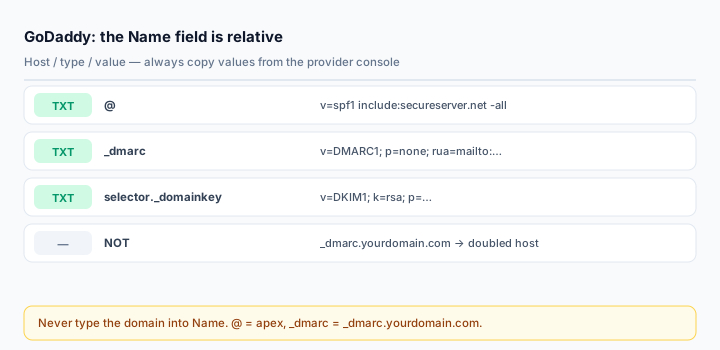
GoDaddy is the registrar for a very large share of small-business domains, and its DNS panel has one behaviour that quietly breaks more email authentication setups than any other single cause: the Name field is relative to your zone. Type the full hostname and GoDaddy cheerfully creates a record at _dmarc.example.com.example.com. The dashboard shows exactly what you typed. Nothing on the internet resolves it.
This guide covers the correct values, the other traps in the panel, and the specific records GoDaddy's own email product needs.
First: is GoDaddy actually serving your DNS?
Registering a domain at GoDaddy and hosting its DNS there are different things. If you ever pointed the domain at Cloudflare, a host, or another DNS provider, the DNS screen still exists and still accepts records — it just is not the zone the world reads.
dig NS yourdomain.com +shortIf the answer ends in domaincontrol.com, GoDaddy is authoritative and this guide applies. Anything else means you must add the records at that provider instead. This check takes ten seconds and saves an afternoon.
Where the panel is
Sign in, open My Products (newer accounts call it Domain Portfolio), select the domain, then DNS or Manage DNS. You land on the record table with an Add New Record button.
The Name field: prefix only
| Record | Type this in Name | Resulting hostname |
|---|---|---|
| SPF | @ | example.com |
| DMARC | _dmarc | _dmarc.example.com |
| DKIM | google._domainkey | google._domainkey.example.com |
| MTA-STS | _mta-sts | _mta-sts.example.com |
| Subdomain DMARC | _dmarc.mail | _dmarc.mail.example.com |
Never type your domain into Name. GoDaddy appends it without warning, saves successfully, and the record is invisible to every checker on the internet.
SPF
Type: TXT Name: @ Value: v=spf1 include:secureserver.net -all TTL: 1 hourinclude:secureserver.net is GoDaddy's own mail platform. If your mail runs elsewhere, use that provider's include instead — Google Workspace uses _spf.google.com, Microsoft 365 uses spf.protection.outlook.com.
If you send through more than one service, merge into a single record. GoDaddy will happily let you create two v=spf1 TXT records, and two records make SPF fail completely:
v=spf1 include:secureserver.net include:_spf.google.com ~allIf your domain, DNS and GoDaddy email are all in the same account, GoDaddy may have already added an SPF record for you. Edit it rather than adding another.
The quote trap
Do not wrap the value in double quotes in the Value field. DNS quotes TXT strings on the wire; GoDaddy does that for you. If you paste "v=spf1 ..." with quotes, they become literal characters and the stored string no longer starts with v=spf1 — so it is not an SPF record at all, and checkers report "no record found" while the panel shows a record sitting right there.
Long DKIM values
GoDaddy's help documentation states a 1024-character limit for a TXT value and 255 for the name. A 2048-bit DKIM public key runs roughly 400 characters, so it fits comfortably in the current editor, which also handles the underlying 255-byte string splitting itself.
Older accounts and older editor versions were known to truncate long values silently. If a DKIM check comes back malformed or the key does not match, the first suspicion is a truncated paste — re-paste, and if it still fails, ask your sending platform for a CNAME-based selector instead of a raw key. CNAMEs sidestep the length problem entirely.
DMARC
Type: TXT Name: _dmarc Value: v=DMARC1; p=none; rua=mailto:dmarc@yourdomain.com; fo=1Start at p=none. GoDaddy's own guidance sometimes suggests jumping to a stricter policy; do not, until reports show every sender aligned. Read the reports with the DMARC Report Analyzer, then move to quarantine and reject.
If you use GoDaddy's own email (Professional Email / Titan)
GoDaddy's mailbox product needs four records, and it generates two DKIM CNAMEs rather than a TXT key:
@                       TXT     v=spf1 include:secureserver.net -all
secureserver1._domainkey CNAME   <target from the Email & Office dashboard>
secureserver2._domainkey CNAME   <target from the Email & Office dashboard>
_dmarc                  TXT     <value from the Email & Office dashboard>
Get the targets from Email & Office Dashboard > Users > Manage > Set mail destination; the SPF and DMARC values are on the same screen. Add SPF and DKIM first, DMARC last.
Verify
dig TXT yourdomain.com +short
dig TXT _dmarc.yourdomain.com +short
dig TXT selector._domainkey.yourdomain.com +short
Then send a real message and read the headers. Passing checks in the panel is not proof; the Email Health Check or a Gmail "Show original" is.
Common mistakes
- Full hostname in the Name field — the doubled-domain record that never resolves.
- Quotes in the Value field, which turn a policy into a text string.
- Editing a zone that is not authoritative because DNS was moved to Cloudflare years ago.
- Domain forwarding left on. GoDaddy may inject its own records for forwarding and parked pages; turn it off if you run real mail.
- Two SPF records after adding a second sender.
Frequently asked questions
Why does my record not show up in a DNS checker?
Ninety percent of the time it is the doubled hostname from typing the full domain into Name. The other ten percent is a zone that is not authoritative. Query the exact hostname with dig and compare it against what the panel displays.
Does GoDaddy support 2048-bit DKIM keys?
Yes, in the current editor, as a single TXT value. If a key fails to verify after a successful save, suspect truncation or stray whitespace rather than the key length.
Can I manage DNS at GoDaddy for a domain registered elsewhere?
Yes — point the domain's nameservers at GoDaddy and the same panel becomes authoritative. The check is still dig NS, not the registrar.
Related Tools
Need Help?
Our tools are designed to be intuitive, but if you need assistance, we're here to help.
About Our Tools
Professional-grade email and DNS diagnostic tools trusted by IT professionals worldwide.