
263 Enterprise Mail: MX, SPF, DKIM & DMARC Setup
Configure 263 Enterprise Mail on a custom domain: mxw.263.net at priority 5, mx.263.net at 10, the spf.263.net include, DKIM generated in the admin console, and DMARC reporting.
Aliyun Mail & DirectMail: DKIM, SPF & DMARC Setup
Step-by-step Aliyun DirectMail sender domain verification: the six DNS records, the SPF include values, region-based DKIM selectors and DMARC publishing.
Amazon SES Email Authentication: SPF, DKIM & DMARC
Enable Easy DKIM in Amazon SES, publish the three CNAMEs, set a custom MAIL FROM domain for SPF alignment, and add DMARC. Covers 2048-bit keys and BYODKIM.
Alibaba Mail (Alimail) SPF, DKIM & DMARC Setup Guide
Alibaba Mail — still widely called Aliyun Enterprise Mail, and sold alongside DingTalk as DingTalk Mail — is the hosted mailbox product behind qiye.aliyun.com. It is not the same service as Aliyun DirectMail, the transactional sending API. Both are sold by Alibaba Cloud, both use DNS records, and almost none of those records are shared.
The confusion is expensive. DirectMail signs with selectors such as aliyun-cn-hangzhou._domainkey; Alibaba Mail signs with default._domainkey. DirectMail authorizes spf1.dm.aliyun.com; Alibaba Mail authorizes spf.qiye.aliyun.com. A company that runs a website contact form through DirectMail and its staff inboxes through Alibaba Mail needs both, correctly merged.
What you need before touching DNS
- An Alibaba Mail tenant with the domain already added in the admin console. MX records published for a domain that is not bound in the console will pass a DNS lookup and still receive nothing.
- Admin access to 企业定制 > 域名管理 > 域名设置 — this is where the DKIM values live, and they are generated per domain.
- DNS write access at whoever runs your authoritative zone. If your nameservers point at Cloudflare, editing records in the registrar panel does nothing.
- A list of everything else that sends as this domain: DirectMail, an ERP, a CRM, an e-commerce platform. Each one contributes an SPF include.
Step 1: the three MX records
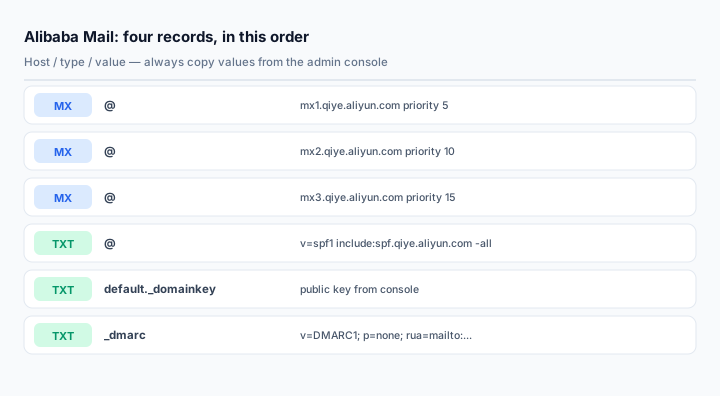
Alibaba Mail publishes three inbound gateways with ascending priority. Lower numbers are tried first:
@    MX   5     mx1.qiye.aliyun.com
@    MX   10    mx2.qiye.aliyun.com
@    MX   15    mx3.qiye.aliyun.com
Three records, not one. A single MX works until the first gateway is unreachable, and then mail queues or bounces. If you are migrating from another provider, delete the old MX records in the same change — leaving a legacy MX at priority 20 means some senders will still deliver to the old mailbox for days.
Check the result before moving on:
dig +short MX yourdomain.com
nslookup -type=mx yourdomain.com
You should see exactly the three hosts above and nothing else.
Step 2: one SPF record, merged
Alibaba Mail is authorized by a single include:
@ TXT v=spf1 include:spf.qiye.aliyun.com -allIf DirectMail also sends for this domain, merge rather than adding a second record:
@ TXT v=spf1 include:spf.qiye.aliyun.com include:spf1.dm.aliyun.com -allTwo v=spf1 TXT records at the same hostname is a permanent error (RFC 7208). Receivers do not pick the better one; they return permerror and evaluate SPF as neither pass nor fail. This is the single most common broken configuration we see on Chinese domains, usually caused by a web developer adding the DirectMail record years after the mailbox record was set up.
Use -all only after you are confident the include list is complete. During a migration, ~all is the safer choice for a week; it marks unauthorized senders as softfail instead of rejecting them outright.
Step 3: DKIM from the console, not from a blog
In the admin console, open 企业定制 > 域名管理 > 域名设置 and click the DKIM configuration link. The console shows the exact host record and the public key for your domain. It is normally:
default._domainkey TXT v=DKIM1; k=rsa; p=MIIBIjANBg...Two details matter more than the value itself:
- Paste the key as one continuous string. DNS panels that hard-wrap at 255 characters, or a copy that carries a line break from the console, produce a record that resolves fine and fails every signature check. If your panel supports it, publish the key as two quoted strings, which the resolver concatenates.
- After switching key length, republish and re-save. Alibaba's own documentation notes that moving between 1024-bit and 2048-bit keys requires updating the DNS record and then re-entering the configuration screen so the server starts signing with the new key. Changing the DNS record alone leaves the old selector signing.
Publish 2048-bit. 1024-bit exists for compatibility with old DNS panels, and some receivers already discount those signatures when scoring.
Step 4: DMARC
Alibaba's documentation suggests p=quarantine in its example. Do not start there. Publish monitoring first:
_dmarc TXT v=DMARC1; p=none; rua=mailto:dmarc@yourdomain.com; fo=1Run it for two to four weeks, read the aggregate reports, confirm that every legitimate sender shows up as aligned, then move to p=quarantine and finally p=reject. The detailed rollout order is in the DMARC setup guide.
Optional records people forget
Client access uses fixed hostnames. If staff configure Outlook or Foxmail manually, they need:
smtp.yourdomain.com    CNAME    smtp.qiye.aliyun.com
imap.yourdomain.com    CNAME    imap.qiye.aliyun.com
pop3.yourdomain.com    CNAME    pop.qiye.aliyun.com
mail.yourdomain.com    CNAME    qiye.aliyun.com
The last one gives you a branded webmail URL. In mainland China the domain must have an ICP filing before the branded login page will work, so plan for that if the site is new.
Verifying the whole chain
Do not stop at "the record exists". Send a message from an Alibaba Mail account to a Gmail address and read the headers:
Authentication-Results: mx.google.com;
       spf=pass smtp.mailfrom=yourdomain.com;
       dkim=pass header.i=@yourdomain.com header.s=default;
       dmarc=pass (p=NONE) header.from=yourdomain.com
Three passes, and the DKIM selector in the header must match the one you published. If SPF passes but DKIM fails, the record is malformed or the server has not picked up the new key. If both pass but DMARC fails, the From header is not aligned — usually because a mailing platform rewrites the envelope sender.
Cross-check with the MX lookup, SPF checker, DKIM checker and DMARC lookup tools.
Common mistakes
- Mixing up Alibaba Mail and DirectMail values. Wrong MX, wrong SPF include, wrong selector. They are two products; pick the one you actually bought.
- Two SPF records. Merge them into one. Always.
- Publishing
include:spf.aliyun.com. That host is not Alibaba Mail's authorized sender. The correct one isspf.qiye.aliyun.com. - Forgetting the DKIM re-save after a key change, then wondering why headers still show the old selector.
- Deleting old MX records too early during migration. Lower the TTL to 600 seconds a day before, add the new MX at a higher priority, and only remove the old one after a full business day of clean delivery.
Frequently asked questions
Can one domain run Alibaba Mail and DirectMail at the same time?
Yes, and it is common: staff mailboxes on Alibaba Mail, website notifications through DirectMail. Publish both SPF includes in one record, keep the DKIM selectors separate (default versus the region selector), and remember that DirectMail's own MX record for the reply address should not replace the mailbox MX unless you have deliberately separated the subdomains.
Does DingTalk Mail need a different setup?
No. DingTalk Mail and Alibaba Mail are the same mail system behind two front ends. The MX hosts, SPF include and DKIM selector are identical; only the admin entry point differs.
Why does the console still show "resolution not effective" after the records are live?
Three causes, in order of frequency: you published records for a domain that is not bound in the console; your DNS provider is not the authoritative server for the zone; or the record was added at a subdomain that is not the one the console checks. Query the exact host with dig and compare it character by character with the console.
Is a 2048-bit DKIM key supported?
Yes, and it should be the default choice for new deployments. Republish the full key and re-save the configuration screen afterward so the mail servers reload the signing key.
Related Tools
Need Help?
Our tools are designed to be intuitive, but if you need assistance, we're here to help.
About Our Tools
Professional-grade email and DNS diagnostic tools trusted by IT professionals worldwide.