
Aliyun Mail & DirectMail: DKIM, SPF & DMARC Setup
Step-by-step Aliyun DirectMail sender domain verification: the six DNS records, the SPF include values, region-based DKIM selectors and DMARC publishing.
Alibaba Mail (Alimail) SPF, DKIM & DMARC Setup Guide
Configure Alibaba Mail / Aliyun Enterprise Mail on your own domain: mx1-mx3.qiye.aliyun.com, the spf.qiye.aliyun.com include, default._domainkey DKIM and a DMARC record.
Amazon SES Email Authentication: SPF, DKIM & DMARC
Enable Easy DKIM in Amazon SES, publish the three CNAMEs, set a custom MAIL FROM domain for SPF alignment, and add DMARC. Covers 2048-bit keys and BYODKIM.
263 Enterprise Mail: MX, SPF, DKIM & DMARC Setup
263 Enterprise Mail (263企业邮箱) has been selling hosted mail to Chinese enterprises for close to three decades, and a large share of its customers are government bodies, state-owned enterprises and financial firms running on the domestic-cloud edition. That customer profile explains two things about its DNS setup: every value is documented in Chinese only, and some tenants receive a gateway hostname that differs from the public one because they were provisioned on the cloud gateway rather than the classic cluster.
The record set below is the common case. Treat the values in your activation email or admin console as authoritative if they differ.
Before you start
- The domain is already added in the 263 admin console. A domain that is not bound there will pass DNS checks and still reject every inbound message.
- You have admin rights to the domain management and DKIM sections of the console.
- You know which edition you bought. Classic, cloud-gateway and the 信创 (domestic-stack) edition can differ in both MX target and DKIM handling.
Step 1: two MX records, in the right order
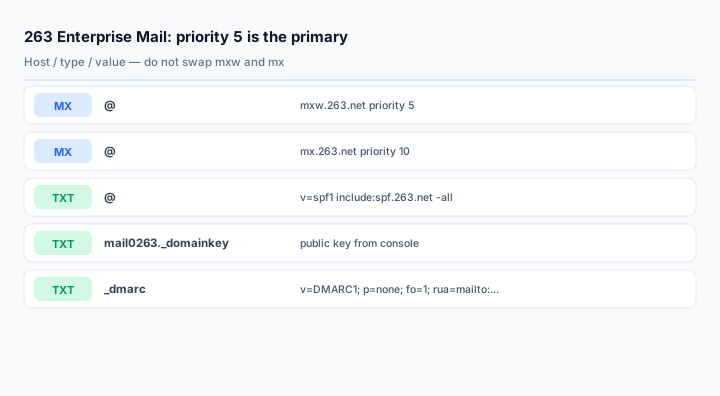
@    MX   5     mxw.263.net
@    MX   10    mx.263.net
263's own client-configuration page lists mxw.263.net at priority 5 and mx.263.net at priority 10. The w host is the primary, not a "western" or "web" variant. Reversing the two — which happens constantly because 5 and 10 look arbitrary — sends all inbound mail to the fallback cluster, and 263's own anti-spam pipeline behaves differently on that path.
Some tenants provisioned on the cloud gateway are told to point at mail.263xmail.com at priority 10 instead. If your activation email says that, use it and ignore the table above; do not publish both generations of records.
Step 2: SPF
@ TXT v=spf1 include:spf.263.net -allOne include, one record. If the domain also sends through a marketing platform, a CRM or an e-commerce backend, merge them:
@ TXT v=spf1 include:spf.263.net include:spf.other-provider.com -allTwo v=spf1 records at the apex produce a permanent error. This is worth checking before you add anything: run a TXT lookup on the root and look for a second policy record left behind by whoever managed the domain last.
Use -all once the list is complete, ~all during a transition week.
Step 3: DKIM
263 enables DKIM from the admin console. The exact path varies by edition, but it sits under domain management / security settings, and the page produces both the selector and the public key. A commonly seen selector on 263 domains is mail0263:
mail0263._domainkey TXT v=DKIM1; k=rsa; p=MIGfMA0GCSqGSIb3DQEBAQUAA4GNADCBiQKBgQ...Do not copy that selector from here. Publish whatever the console displays for your domain, because the selector is assigned per tenant and older accounts use different values. The important rules are the same everywhere:
- Paste the key as one continuous string, with no line breaks or trailing spaces.
- Publish on the exact host the console shows, including the
._domainkeysuffix. Do not append the domain name — your DNS panel adds it. - Enable signing after publishing. A record on its own does not make the server sign.
- Prefer 2048-bit if the console offers the choice.
Step 4: DMARC
_dmarc TXT v=DMARC1; p=none; fo=1; rua=mailto:dmarc@yourdomain.com; ruf=mailto:dmarc@yourdomain.com263's published template uses both rua and ruf. Forensic reports (ruf) are rarely sent by large receivers today and can contain user data, so many teams drop ruf and keep only rua. Either is acceptable; what matters is that the address exists and someone reads it.
Start at p=none regardless of what any template suggests, then tighten after two to four weeks. See the DMARC setup guide for the sequence.
Optional records for client access
If staff configure mail clients with your own hostnames rather than 263's defaults, publish these CNAMEs:
pop.yourdomain.com     CNAME    pop.263.net
smtp.yourdomain.com    CNAME    smtp.263.net
imap.yourdomain.com    CNAME    imap.263.net
mail.yourdomain.com    CNAME    mail.263.net
The default server names, for reference, are pop.263.net (110/995), smtp.263.net (25/465) and imap.263.net (143/993). Overseas users have a parallel set: popw, smtpw, imapw on the same ports.
Verifying
dig +short MX yourdomain.com
dig +short TXT yourdomain.com
dig +short TXT mail0263._domainkey.yourdomain.com
dig +short TXT _dmarc.yourdomain.com
Then send a message to a Gmail address and confirm three passes in the headers. SPF passing while DKIM fails almost always means the selector in the header does not match the record you published, or the key was truncated.
The MX lookup and SPF checker tools cover the first two records; use the DKIM checker for the selector.
Common mistakes
- Swapping the MX priorities. Priority 5 is
mxw.263.net; priority 10 ismx.263.net. - Publishing both the classic MX pair and the cloud-gateway MX. Pick the generation your tenant was provisioned on.
- Assuming the DKIM selector is universal. It is assigned per tenant; always read it from the console.
- Adding a second SPF record for a marketing tool instead of merging.
- Setting
p=rejecton day one and then losing internal notification mail that was never authenticated.
Frequently asked questions
Why does 263 use a different MX for the primary?
mxw is the primary inbound gateway in 263's classic cluster. The naming is historical and not documented publicly; what matters is the priority value published in their help center: 5 for mxw, 10 for mx.
Can I keep my existing mailbox provider during the migration?
Not on the same hostname. Either cut the MX over in one change, or run the new provider on a subdomain such as mail.yourdomain.com while the old one keeps the apex. Running two MX sets on the apex splits inbound mail unpredictably.
Does the domestic-stack (信创) edition need different DNS records?
The authentication records are the same shape, but the gateway hostnames can differ because the tenant sits on a different infrastructure. Use the values in the provisioning document rather than the public help center.
What if DKIM verification never succeeds?
Check three things in order: the selector in the console versus the host record you published; whether the console shows signing as enabled; and whether the key contains a line break. A fourth, less obvious cause is a DNS provider that splits long TXT strings incorrectly — publish the key as two quoted chunks if the panel offers that option.
Related Tools
Need Help?
Our tools are designed to be intuitive, but if you need assistance, we're here to help.
About Our Tools
Professional-grade email and DNS diagnostic tools trusted by IT professionals worldwide.