
BIMI Setup Guide: SVG Logos, VMCs & DMARC Prerequisites
BIMI setup from DMARC enforcement to verified logos: building an SVG Tiny PS file, choosing a VMC or CMC, publishing the record and which inboxes display it.
DKIM Setup Guide: Selectors, Keys & DNS Records
Set up DKIM correctly: how selectors and the _domainkey DNS record work, 2048-bit keys, canonicalization and dual-selector rotation.
Publishing SPF, DKIM & DMARC at Any DNS Provider
Publish SPF, DKIM and DMARC at any DNS provider: the three record fields, the @ vs FQDN hostname trap, and a quick-reference table for major providers.
DMARC Setup Guide: Records, Policies & Rollout
DMARC is the policy layer of email authentication: it tells receiving servers what to do when a message claiming to be from your domain fails SPF and DKIM, and it requires that whichever check passed actually aligns with the domain the recipient sees. Without DMARC, a spoofing attacker can use your brand with no consequence; with DMARC rolled out correctly, spoofed mail is rejected outright. The catch is that an aggressive policy deployed too early blocks your own legitimate mail — which is why this guide spends as much time on the rollout as on the record syntax.
Prerequisites: a correct single SPF record and DKIM signing from every legitimate sender, covered in the DKIM setup guide. If you are still building the foundation, start with the authentication overview.
How DMARC passes (and fails)
The single most important rule: DMARC passes when SPF passes and aligns, or DKIM passes and aligns. Either one is sufficient — both are not required. Alignment means the domain that passed (the envelope domain for SPF, the d= domain for DKIM) shares an organization domain with the visible From header.
This explains the everyday mystery of "SPF passes, DKIM passes, DMARC fails": both checks passed against your ESP's domain, while the From header shows yours. Nothing is aligned, so DMARC fails. Diagnosing that specific case is the subject of how to fix DMARC failures.
The DMARC record
DMARC is a TXT record at _dmarc.yourdomain.com. The value must start with v=DMARC1 immediately followed by a semicolon. A complete monitoring-phase record:
v=DMARC1; p=none; rua=mailto:dmarc-reports@yourdomain.com; adkim=r; aspf=r; fo=1The tags that matter:
p=— the policy for the From domain:none(monitor only, report everything),quarantine(spam-folder failing mail),reject(refuse it at the SMTP level).sp=— the policy for subdomains of the From domain, overridingp=. If your subdomains do not send mail, setsp=reject— leaving it atnonewhile the parent enforces is a spoofing bypass.adkim=/aspf=— alignment mode for DKIM and SPF.r(relaxed) requires the same organizational domain (mail.example.com aligns with example.com);s(strict) requires an exact match. Relaxed is the standard choice.pct=— the percentage of failing messages the policy applies to, sampled by the receiver. It only makes sense with quarantine or reject, as a throttle during rollout.rua=— aggregate report destination. Receivers send a daily XML summary of every message claiming your domain: source IP, SPF/DKIM results, alignment outcome. This is your monitoring channel and the whole reason a staged rollout works.ruf=— forensic report destination, containing copies of failing messages. Support among receivers is poor, the samples can include your legitimate users' content, and privacy handling gets complicated — most setups omit it.fo=— conditions that trigger forensic reports (for examplefo=1: any failure). Only relevant if you use ruf.
External report addresses need authorization
If your rua points at a different domain than the one being reported on — say you collect reports for yourdomain.com at reports.example.com — the receiving domain must publish an authorization record, or other receivers will (correctly) refuse to send reports there:
yourdomain.com._report._dmarc.example.com TXT "v=DMARC1"The pattern is <reported-domain>._report._dmarc.<report-receiver>. Reports addressed to your own domain need nothing extra.
The staged rollout
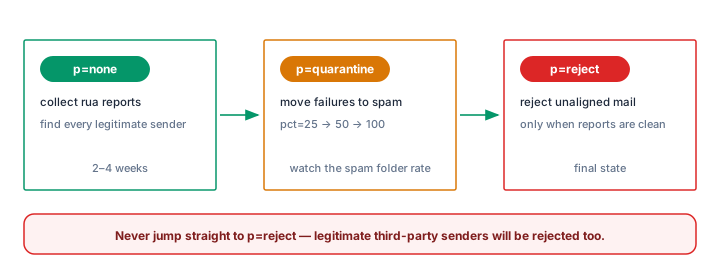
DMARC's design intent is monitoring first, enforcement later. The sequence:
- Monitor with p=none for 2–4 weeks. Nothing is blocked. Read the daily rua reports, group them by source IP and alignment result, and identify every legitimate sender that is failing SPF or DKIM — fix those at the source (custom Return-Path, custom DKIM domain, updated SPF includes). The DMARC Report Analyzer parses the XML and does the grouping for you.
- Escalate to quarantine with pct sampling.
25% of failing mail goes to spam. Watch reports for a week, confirm no legitimate mail is caught, then raise tov=DMARC1; p=quarantine; pct=25; rua=mailto:dmarc-reports@yourdomain.compct=50, thenpct=100. - Enforce with reject.
Failing mail is refused outright. Keep rua in place permanently — enforcement without monitoring means you will not notice when a new tool starts sending unauthenticated mail next quarter.v=DMARC1; p=reject; rua=mailto:dmarc-reports@yourdomain.com
The failure mode of skipping stages is predictable: a CRM, an invoicing system or the office printer sends unauthenticated mail, and the day p=reject lands, those messages vanish. Rejection is not recoverable from the spam folder. Never move to reject based on assumptions — only on reports showing 100% of legitimate traffic passing alignment.
Verify and monitor
Build the record with the DMARC Generator, then confirm it resolves and parses with the DMARC Checker — it will flag tag typos, a missing semicolon after v=DMARC1, and missing rua addresses. Once live, send a test message to Gmail and check that dmarc=pass appears in Show original, and that aggregate reports start arriving within about a day. For the whole picture at once, run the Email Health Check.
Keep reading the reports weekly even after full enforcement. The reports are how you catch the next unauthenticated sender before your users do — and how you confirm the scale of the spoofing your reject policy is now blocking. Sender-reputation context is in the reputation warm-up guide, and the provider-specific prerequisites are in the Gmail and Yahoo requirements guide.
Common mistakes
- Treating p=none as "done." A monitoring policy blocks nothing. It is a phase, not a destination — the spoofing protection only exists at quarantine and reject.
- Leaving pct low forever. pct=25 exists to make a transition window survivable. If it is still 25 a year later, three quarters of failing mail — including actual spoofing — is delivered.
- rua pointing somewhere that cannot receive reports. An address nobody reads, a mailbox with no external authorization record, or a domain that silently drops the XML — the rollout then runs blind.
- Third-party senders never inventoried. CRM, invoicing, helpdesk and ticketing systems are the usual stragglers. They only surface in reports, which is exactly why the p=none phase exists.
- sp=none left as a subdomain bypass. With the parent at reject but sp=none, spoofers simply move to a subdomain of your own domain. Set sp explicitly (or publish child records with
v=spf1 -allas described in the SPF guide).
Frequently asked questions
Do SPF and DKIM both need to pass for DMARC to pass?
No — one aligned pass is enough. SPF often fails after forwarding while the DKIM signature survives, and mail from an ESP may pass DKIM alignment even where SPF cannot align. That redundancy is deliberate.
How long should I stay at p=none?
Long enough to see every legitimate sender in the reports — typically 2–4 weeks minimum, longer if your mail volume is low or seasonal. What matters is coverage, not the calendar.
Can I go straight to p=reject?
Only if you like losing mail. Anything you did not know was sending — a billing system, a scanner, a forgotten SaaS tool — gets refused outright, and rejected mail does not come back from a spam folder. Monitor first; that is the protocol's own design.
Why are my ruf forensic reports empty?
Most receivers do not send ruf reports at all, citing privacy and volume. Build your process on rua aggregates, which nearly all major receivers support, and treat ruf as a bonus when it appears.
What is the difference between p=quarantine and p=reject?
Quarantine delivers failing mail to the spam folder — recoverable, inspectable, safe for rollout. Reject refuses the message during the SMTP transaction — nothing is delivered, nothing is recoverable. Quarantine is the last safe step before full enforcement.
Related Tools
Need Help?
Our tools are designed to be intuitive, but if you need assistance, we're here to help.
About Our Tools
Professional-grade email and DNS diagnostic tools trusted by IT professionals worldwide.