
BIMI Setup Guide: SVG Logos, VMCs & DMARC Prerequisites
BIMI setup from DMARC enforcement to verified logos: building an SVG Tiny PS file, choosing a VMC or CMC, publishing the record and which inboxes display it.
DKIM Setup Guide: Selectors, Keys & DNS Records
Set up DKIM correctly: how selectors and the _domainkey DNS record work, 2048-bit keys, canonicalization and dual-selector rotation.
DMARC Setup Guide: Records, Policies & Rollout
Publish DMARC the right way: tag syntax (p, sp, pct, rua, adkim), alignment rules, external report authorization and the staged none-quarantine-reject rollout.
SPF Record Setup: Syntax, Lookups & Common Mistakes
SPF (Sender Policy Framework) tells receiving servers which hosts may send email for your domain. It is the foundation of email authentication: DMARC cannot pass without it, Gmail and Yahoo require it for bulk senders, and a broken record quietly pushes legitimate mail toward spam. This guide covers the syntax, the lookup limits that break records, and the most common mistakes.
New to the three-protocol picture? Start with the email authentication overview; this guide covers SPF alone.
What SPF actually checks
SPF validates the envelope sender — the MAIL FROM (Return-Path) address exchanged during the SMTP transaction — not the From header the recipient sees. The two are independent: your marketing platform may put its own bounce domain in Return-Path while displaying your brand in From, and an attacker can mix them freely.
The practical consequence: a passing SPF check does not by itself protect your visible From domain. Binding the SPF result to the header domain is DMARC's job, via alignment — which is why DMARC sits on top of SPF rather than replacing it.
Anatomy of an SPF record
SPF is a single DNS TXT record at the root of your domain. The value must start with v=spf1, followed by mechanisms, and should end with an all mechanism covering unmatched hosts. A complete, working record for a company sending from its own server plus Google Workspace and Microsoft 365:
v=spf1 ip4:203.0.113.10 include:_spf.google.com include:spf.protection.outlook.com ~allThe mechanisms:
ip4:/ip6:— authorize an IP address or CIDR range directly. Consumes no DNS lookup.include:— delegate to another domain's SPF record (Google Workspace, Microsoft 365). Each include, and everything nested inside it, consumes lookups.a/mx— authorize the IPs behind the domain's A or MX records. Every written occurrence counts toward the lookup limit.exists:— matches if the given name resolves; rarely needed.ptr— reverse-DNS matching. Do not use it — RFC 7208 discouragesptras unreliable and expensive, and large receivers ignore it.
Qualifiers:
+— pass (the default when no qualifier is written)-— fail: host explicitly unauthorized~— softfail: a weak failure, typically treated as suspicious but not rejected?— neutral: no assertion either way
In practice the choice is between ~all and -all. Start with ~all while you are still discovering senders; once every legitimate source passes consistently in DMARC reports, tighten to -all. Going straight to -all on day one reliably breaks mail you did not know you were sending.
The 10-lookup limit
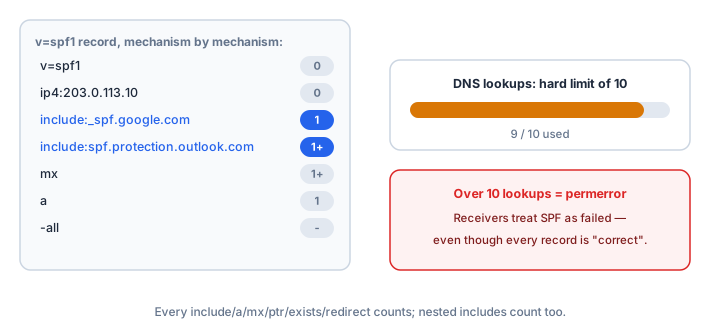
RFC 7208 caps SPF evaluation at 10 DNS lookups per check. Every include, a, mx, ptr, exists and redirect term counts — including lookups triggered inside included records, and each additional occurrence if you write a or mx more than once. Exceed the limit and the record evaluates to permerror, which receivers treat as a broken record — worse than no SPF at all.
A second, lesser-known limit: at most 2 void lookups (queries returning NXDOMAIN or no usable answer) — more also triggers permerror. The usual cause is an included domain that has since deleted its own SPF record.
Modern SaaS stacks burn lookups fast: Google Workspace costs 3, Microsoft 365 around 4 through nested includes, and each marketing or helpdesk tool adds more. Near the ceiling, replace includes with literal ip4: blocks or flatten automatically — see SPF flattening with Cloudflare for the trade-offs.
TXT record rules: one record, 255-character strings
Three DNS-level constraints apply:
- Exactly one SPF record per domain. Two TXT records that both start with
v=spf1producepermerror. If a provider tells you to add an SPF record and you already have one, merge its mechanisms into your existing record instead of publishing a second. - TXT only. The dedicated SPF DNS record type was obsoleted years ago; receivers only read the TXT version. Values in any other record type do nothing.
- 255 bytes per string. Longer values must be split into multiple quoted strings — for example
"v=spf1 ip4:203.0.113.10 include:_spf" ".google.com ~all"— which DNS clients concatenate before evaluation. Most panels split automatically, but pasting a pre-split value into a panel that does not is a classic breakage.
Subdomains do not inherit SPF
SPF is evaluated against the exact envelope domain. A record on yourdomain.com does nothing for mail from billing.yourdomain.com — the receiver looks for SPF there and, finding none, gets no authorization signal. For every subdomain that does not send mail, publish a null SPF record to close the spoofing gap:
v=spf1 -allIt states plainly that nothing from the subdomain is legitimate — exactly what you want for www, internal hostnames and parked names.
Step-by-step: publishing your SPF record
- Inventory your senders. List everything that sends mail as your domain: your own mail server, Google Workspace or Microsoft 365, CRM, marketing, billing, helpdesk, website forms, printers and scanners emailing over SMTP. A missed sender becomes a DMARC failure later — see the DMARC troubleshooting guide.
- Build the record. Use
ip4:entries for your own infrastructure and oneinclude:per SaaS provider. The SPF Generator assembles the record and shows the lookup cost as you add mechanisms. - Publish one TXT record at yourdomain.com, ending in
~all. - Verify immediately. Run the SPF Checker — it parses every mechanism, counts nested lookups, and flags
permerrorconditions before your users do. - Watch and tighten. Once DMARC reports show every legitimate sender passing, change
~allto-all.
Verify it end to end
After the record is live, send a test message to a Gmail account and open Show original — you want spf=pass next to the envelope domain. For the full picture, run the Email Health Check, and inspect raw DNS answers with the TXT Lookup tool when you suspect panel-side splitting. Provider walk-throughs: Google Workspace, Microsoft 365, DNS providers.
Common mistakes
- Publishing two SPF records. A second v=spf1 TXT record guarantees
permerror— there is one record, and everything lives inside it. - Publishing SPF as the wrong record type. The SPF record type is obsolete and ignored; the value must be in TXT.
- Including a domain that does not send your mail. It adds lookups without authorization — and if that domain later breaks its record, you inherit the
permerror. - Exceeding 10 lookups. The record looks fine in the panel but fails at every receiver. Count nested includes, not just the terms you typed.
- Believing SPF protects the From header. It does not. SPF authenticates the envelope domain; protecting the visible From domain requires alignment, enforced by DMARC.
Frequently asked questions
Can I have one SPF record per provider?
No. A domain carries exactly one SPF record; multiple v=spf1 TXTs are a hard permerror. Combine all providers inside the single record.
My SPF passes but DMARC fails — why?
Almost always alignment: the domain that passed SPF (the envelope sender) does not match the From domain the recipient sees. Use a provider that lets you set your own Return-Path domain, or rely on DKIM alignment — the full diagnostic is in how to fix DMARC failures.
Do subdomains need their own SPF records?
Yes, if they send mail — SPF does not inherit. A subdomain that never sends should carry the null record v=spf1 -all so it cannot be spoofed.
Should I use ~all or -all?
~all during rollout, while your sender inventory is uncertain; -all once DMARC reports confirm every legitimate source passes. ?all is rarely useful, and +all authorizes the entire internet — never use it.
How long until my SPF change takes effect?
Usually minutes. The ceiling is your record's TTL — set it to an hour or less while iterating, and allow 24–48 hours for the slowest caches.
Related Tools
Need Help?
Our tools are designed to be intuitive, but if you need assistance, we're here to help.
About Our Tools
Professional-grade email and DNS diagnostic tools trusted by IT professionals worldwide.