
BIMI Setup Guide: SVG Logos, VMCs & DMARC Prerequisites
BIMI setup from DMARC enforcement to verified logos: building an SVG Tiny PS file, choosing a VMC or CMC, publishing the record and which inboxes display it.
DMARC Setup Guide: Records, Policies & Rollout
Publish DMARC the right way: tag syntax (p, sp, pct, rua, adkim), alignment rules, external report authorization and the staged none-quarantine-reject rollout.
Publishing SPF, DKIM & DMARC at Any DNS Provider
Publish SPF, DKIM and DMARC at any DNS provider: the three record fields, the @ vs FQDN hostname trap, and a quick-reference table for major providers.
DKIM Setup Guide: Selectors, Keys & DNS Records
DKIM (DomainKeys Identified Mail) gives every message a cryptographic signature that receivers verify against a public key in your DNS. It is the authentication method that survives forwarding, it is required by Gmail and Yahoo for bulk senders, and its failure mode is silent: mail still gets delivered, just into spam. This guide covers how selectors and keys fit together, how to publish the DNS records correctly, and how to rotate keys without breaking in-flight mail.
For the big-picture ordering of SPF, DKIM and DMARC, read the authentication overview first; here we assume SPF is done and focus on DKIM alone.
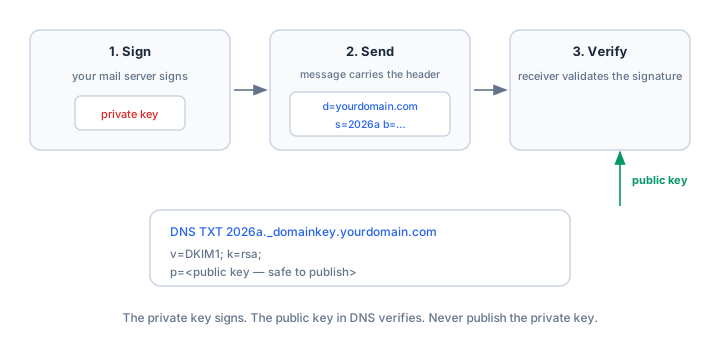
How DKIM works: the signature and the key
Your mail server adds a DKIM-Signature header to each message. An example:
DKIM-Signature: v=1; a=rsa-sha256; d=yourdomain.com; s=sel-branded-2026;
    c=relaxed/relaxed; q=dns/txt;
    h=from:to:subject:date:mime-version:content-type;
    bh=<body hash>; b=<signature>
Two tags matter most:
d=— the signing domain. DMARC checks it for alignment with the visible From domain, so it must be your domain (a subdomain works under relaxed alignment).s=— the selector, a label identifying which key pair signed the message. It lets you publish multiple keys at once, which is what makes zero-downtime rotation possible.
The receiver takes d= and s=, fetches the public key from DNS and verifies the signature against the message as received; if any signed header or the body was modified in transit, verification fails.
The DNS record: selector._domainkey
The public key is published as a TXT record at <selector>._domainkey.<domain>. For the selector above:
sel-branded-2026._domainkey.yourdomain.com  TXT
"v=DKIM1; k=rsa; p=MIIBIjANBgkqhkiG9w0BAQEFAAOCAQ8AMIIBCgKCAQEA..."
Tags in the value:
v=DKIM1— identifies this TXT record as a DKIM key.k=rsa— the key type; RSA is the universal default.p=— the base64-encoded public key. An emptyp=(v=DKIM1; k=rsa; p=) means the key is revoked — receivers must treat signatures under this selector as permanently failed.
The matching private key stays inside the sending system and must never leave it — not into a ticket, a chat message, or a code repository. Anyone holding the private key can sign mail as your domain, a strictly worse outcome than having no DKIM at all.
Key size: use 2048-bit
2048-bit RSA is the current recommendation for new keys:
- 1024-bit is now a weak key. Some receivers already downgrade or reject 1024-bit signatures, and the gap only widens. Do not create new 1024-bit keys.
- 4096-bit is rarely worth it. The DNS record grows long enough that some resolvers hit UDP packet-size limits and truncate, and some panels cannot store it. Unless you have a specific reason and have tested resolution, stay at 2048-bit.
Key size is a property of the key pair, chosen where you generate it — mail server config or ESP admin console — not something you edit in DNS.
Canonicalization and the h= list
Two parts of the signature header control what exactly gets signed:
c=canonicalization — how the message is normalized before hashing.relaxed/relaxedtolerates harmless whitespace and line-wrapping changes (first value: headers, second: body);simplerequires byte-exact preservation. Relaxed for both is the common, resilient default.h=header list — which headers are covered.fromis required; sensible lists also coverto,subject,date,mime-versionandcontent-type. More signed headers make tampering harder — but headers added later (like an ESP'slist-unsubscribe) must not be in the list.
One tag your signer should not emit: l= (body length). It signs only the first N bytes of the body, allowing an intermediary to append content after the signature and still verify. Modern signers omit it; if yours has the option, turn it off.
Publishing the record: 255 characters and quotes
A 2048-bit public key in base64 runs about 340 characters, past the 255-byte limit of a single TXT string, so the value must be split into multiple quoted strings in your DNS panel:
"v=DKIM1; k=rsa; p=MIIBIjANBgkqhkiG9w0BAQEFAAOCAQ8AMIIBCgKCAQEA..."
"...remainder-of-public-key..."
DNS clients concatenate the strings, so the key arrives intact. The practical failures here are quoting (a stray quote or space inside the key makes the record unparseable) and truncation (some panels silently cut long values — verify what was actually published). If your ESP offers a CNAME to its key instead, that is usually easier: one CNAME, no splitting, and the provider rotates the key on its side.
Key rotation with dual selectors
Rotate DKIM keys periodically — annually is a reasonable default — and always overlap old and new:
- Generate a new key pair under a new selector and publish its TXT record while the old selector stays live. Two keys coexist.
- Switch the signer to the new selector. From this point new mail is signed with the new key.
- Observe for 1–2 weeks. Mail signed before the switch is still in queues and re-reads DNS at verification time; the old record must stay published until that mail drains.
- Remove the old record — or keep it with an empty
p=to mark the key revoked rather than an ambiguous NXDOMAIN.
Deleting the old record on day one is the classic rotation outage: every message still in transit fails verification and looks forged exactly when your DMARC policy is strictest.
Verify your setup
Check the published key with the DKIM Checker — enter your domain and the selector your provider uses; it confirms the record resolves, parses cleanly and exposes a usable key. To see the signature in action, send a test message and read the raw headers with the Email Header Analyzer, which parses the DKIM-Signature and the receiver's Authentication-Results — also where DKIM failures show up in production (see the DMARC troubleshooting guide). Console paths per provider: Google Workspace, Microsoft 365; DNS panel quirks: the DNS provider guide.
Common mistakes
- Getting the selector name wrong. The DNS label must match the
s=value exactly — a typo means the receiver queries a nonexistent name and every signature fails. - Stray quotes or spaces in the key value. A hand-split TXT record with a space inside the base64, or quotes in the middle, makes the record unparseable. Verify what was actually published, not what you pasted.
- Confusing the public and private key. The DNS record carries the public key (
p=); the private key lives in the sending system. Publishing the private key anywhere is a security incident — rotate immediately. - Deleting the old record during rotation. In-flight mail still needs the old public key. Overlap selectors for 1–2 weeks before removing the old one.
- Calling DKIM "encryption." DKIM is a signature, not encryption. Nothing is hidden or encrypted — the signature only proves the message was not altered and identifies the signer.
Frequently asked questions
How many selectors should I have?
One active selector per sending service is normal; during rotation you temporarily have two. Some large senders use per-service selectors (for example s1 for the CRM, mta for the mail server) purely for organization.
Does DKIM encrypt my email?
No. DKIM signs messages; it does not encrypt them — anyone can still read the body. End-to-end encryption is a different technology (S/MIME, PGP), unrelated to deliverability.
My DKIM fails only at one receiver — why?
Most often DNS propagation or splitting at that receiver's resolver, or an intermediary modifying the message (mailing lists are notorious). Read that receiver's Authentication-Results via the Header Analyzer: "no key for selector" means DNS, "signature did not verify" means modification.
What does an empty p= mean?
The key is revoked: receivers must treat signatures under that selector as failed forever. It is the correct final state for a retired key — better than deleting the record outright.
How often should I rotate keys?
Yearly is a sensible default; rotate immediately if a private key may have been exposed. The procedure above — new selector, switch, observe, clean up — applies regardless of cadence.
Related Tools
Need Help?
Our tools are designed to be intuitive, but if you need assistance, we're here to help.
About Our Tools
Professional-grade email and DNS diagnostic tools trusted by IT professionals worldwide.