
ARC (Authenticated Received Chain): What It Is and When You Need It
ARC (RFC 8617) is not another authentication method. How forwarders seal original SPF/DKIM results, how the chain works, and when you need it.
Email Blacklist Removal Guide: How to Check Your IP and Request Delisting
Check your sending IP against major email blocklists and request delisting from Spamhaus, Microsoft Outlook, Barracuda and SpamEatingMonkey, with official portals, request templates and a post-removal verification checklist.
Email Bounce Codes Explained: SMTP 4xx & 5xx
SMTP bounce codes explained: permanent 5xx vs temporary 4xx failures, what codes like 5.7.1, 5.7.26 and 4.7.1 mean, and how to fix each one.
Sender Reputation & Domain Warm-Up: The Practical Guide
Mailbox providers keep score. Every message feeds a rolling assessment of your IP address and your domain: how many bounces you produce, how many recipients hit "report spam", whether your authentication holds. That score, more than your content, decides the inbox.
New infrastructure starts with no score at all, and providers treat the unknown as suspicious. Warming up means building a track record deliberately: small volumes, engaged recipients only, gradual growth.
What you need
- SPF, DKIM and DMARC already working on your domain — see the authentication guide.
- Your sending platform's engagement and bounce data.
- Google Postmaster Tools, plus a recipient list segmented by engagement.
What sender reputation is made of
- IP reputation attaches to the sending address — decisive for dedicated IPs and on-premises servers. Shared pools blend your behavior with your neighbors'.
- Domain reputation attaches to the visible From domain and follows you across IPs; since Gmail's 2024 rules it is the dominant signal for most senders.
Google Postmaster Tools shows the domain picture directly: reputation (Bad to High), spam rate, authentication pass rates. Complaint rate is the metric with a hard cliff — keep bulk mail below 0.3%, and well-run programs stay under 0.1%.
Why new domains and IPs must be warmed up
A new domain sending 50,000 messages on day one has the statistical profile of a spam operation: no history, no engagement, huge volume. Filters respond the way any risk system does — assume the worst until evidence accumulates.
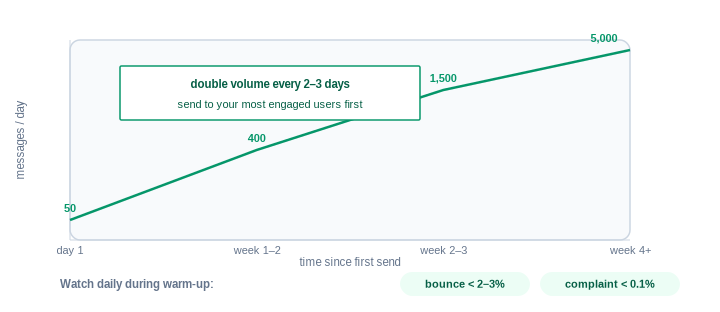
Warm-up works because reputation is weighted toward recent behavior. The standard pattern:
- Start at 20–50 messages per day, only to recent openers and clickers.
- Double every 2–3 days while the metrics stay green.
- Reach full volume in 2–4 weeks; larger targets need longer ramps. The data sets the pace, not the calendar.
Transactional mail (receipts, password resets) can usually flow immediately — recipients requested it. The careful ramp is for marketing and bulk campaigns.
What to monitor during warm-up
- Bounce rate below 2–3% per campaign — a spike means the list is dirty; stop and clean.
- Complaint rate below 0.1% in Postmaster Tools. This is the least forgiving metric.
- Domain reputation trend — Medium and climbing toward High as volume grows.
- Inbox placement spot checks with the Deliverability Test, and authentication passing at 100%.
If any metric turns red, freeze the volume. A paused ramp costs days; a trashed reputation costs weeks.
The subdomain strategy
Send marketing mail from send.yourdomain.com instead of the root: complaints against the marketing stream leave corporate mail's reputation intact. Configure SPF, DKIM and DMARC for the subdomain exactly as for the root, and give each sending vendor its own subdomain so one problem cannot sink everything.
Behaviors that destroy reputation
- Purchased lists — stale addresses, spam traps, zero engagement.
- Blasting old subscribers — a list untouched for a year, suddenly mailbombed, looks exactly like a spam run.
- Reviving a cold list in one campaign — start with a tiny recent segment and ramp as if the domain were new.
- Retrying hard bounces — invalid addresses leave after the first 5xx, as the bounce codes guide explains.
All of this connects to the Gmail and Yahoo sender requirements in force since 2024 — authentication, low complaints, one-click unsubscribe. See the sender requirements guide.
Verify your standing
- Deliverability Test — placement and authentication in one run.
- Email Health Check — domain-wide record audit before the ramp.
- Blacklist Checker and DMARC Report Analyzer — confirm a clean IP and authorized senders.
Common mistakes
- Skipping warm-up because "the list is legit". Filters cannot see intent, only the statistical pattern — and a cold start at full volume looks like spam.
- Warming up on the whole list. Early recipients teach the filter what your mail looks like; make the first lessons your best audience.
- Ignoring Postmaster Tools at low volume. It is free and it is the only direct view of Gmail's score for your domain.
- Treating warm-up as one-time. After a long pause, an IP or domain cools off and needs a partial re-warm.
Frequently asked questions
Does a new domain need warm-up for transactional mail?
Usually not at full rigor — requested mail generates the right signals naturally. Keep authentication clean and watch bounces; a broken recipient database hurts transactional senders too.
How long does warm-up take?
Typically 2–4 weeks at moderate volumes. Bigger targets, cold audiences or past problems extend it. Keep ramping only while bounce, complaint and placement numbers hold.
My reputation dropped after months of good behavior. What changed?
Check, in order: new blocklist listings, a bounce spike from a stale segment, a new sending service that broke DMARC alignment, and complaint rate in Postmaster Tools. Domain reputation usually follows one of those within days.
Related Tools
Need Help?
Our tools are designed to be intuitive, but if you need assistance, we're here to help.
About Our Tools
Professional-grade email and DNS diagnostic tools trusted by IT professionals worldwide.