
263 Enterprise Mail: MX, SPF, DKIM & DMARC Setup
Configure 263 Enterprise Mail on a custom domain: mxw.263.net at priority 5, mx.263.net at 10, the spf.263.net include, DKIM generated in the admin console, and DMARC reporting.
Aliyun Mail & DirectMail: DKIM, SPF & DMARC Setup
Step-by-step Aliyun DirectMail sender domain verification: the six DNS records, the SPF include values, region-based DKIM selectors and DMARC publishing.
Alibaba Mail (Alimail) SPF, DKIM & DMARC Setup Guide
Configure Alibaba Mail / Aliyun Enterprise Mail on your own domain: mx1-mx3.qiye.aliyun.com, the spf.qiye.aliyun.com include, default._domainkey DKIM and a DMARC record.
Namecheap Advanced DNS: SPF, DKIM & DMARC Setup
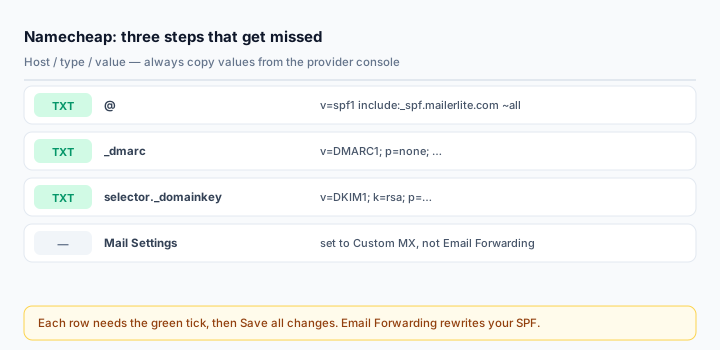
Namecheap's Advanced DNS panel is one of the cleaner ones — no quoting games, no aggressive length limits. The failures there are procedural rather than technical, and there are three of them: records that are never saved because the row was not confirmed, an SPF record that gets silently overwritten by Email Forwarding, and a Host field where people keep typing the domain name.
Which DNS is Namecheap answering?
Namecheap serves DNS three ways, and only two of them use Advanced DNS:
- BasicDNS / FreeDNS — nameservers
dns1.registrar-servers.com,dns2.registrar-servers.com. Advanced DNS applies. - PremiumDNS —
pdns1.registrar-servers.com,pdns2.registrar-servers.com. Advanced DNS applies. - Namecheap hosting — nameservers ending in
namecheaphosting.com. DNS is answered by cPanel; edit the Zone Editor there, not Advanced DNS.
dig NS yourdomain.com +shortGetting this wrong produces records that are saved, displayed, and never queried by the outside world.
Where the panel is
Sign in, open Domain List, click Manage next to the domain, then the Advanced DNS tab. Records live under Host Records; Add New Record creates a row.
The Host field: prefix only
| Record | Host | Value |
|---|---|---|
| SPF | @ | v=spf1 include:_spf.google.com ~all |
| DMARC | _dmarc | v=DMARC1; p=none; rua=mailto:dmarc@yourdomain.com |
| DKIM | selector._domainkey | v=DKIM1; k=rsa; p=MIIBIjANBg... |
Namecheap appends your domain automatically. Entering _dmarc.yourdomain.com in Host creates _dmarc.yourdomain.com.yourdomain.com. Namecheap's own knowledge base says this explicitly, which tells you how often it happens.
The step everyone misses: Save all changes
Each new row needs the green checkmark to be accepted, and the whole page needs Save all changes to be committed. A row that shows in the table but was never confirmed is discarded the moment you navigate away, with no warning and no error on return.
If a record you "just added" is not resolving, look at it again in a fresh page load before debugging anything else.
SPF
Type: TXT Host: @ Value: v=spf1 include:_spf.google.com ~all TTL: AutomaticOne record per domain. If one already exists at @, edit it — do not add a second v=spf1 row. Two records make SPF fail completely, and the panel will not stop you.
The Email Forwarding trap
On the same Advanced DNS tab there is a Mail Settings dropdown. Choosing Email Forwarding makes Namecheap create its own MX records and inject an SPF record that it will not let you delete. If you send real mail through Google Workspace, Microsoft 365 or an ESP, that injected record competes with yours and your carefully merged SPF is replaced.
Set Mail Settings to Custom MX (or Off, if you do not use Namecheap forwarding at all) before you publish your own records. This is the single most confusing failure mode on Namecheap: the SPF you saved is simply not the SPF being served.
DKIM keys and the 255-character myth
Namecheap's BasicDNS accepts long TXT values — around 2,500 characters in one field — so a 2048-bit or even 4096-bit key pastes in whole. The 255-character splitting trick you read about applies to raw cPanel/BIND zones, not this panel.
So: paste one line, no quotes, no manual chunking. If the form rejects it, the usual cause is a line break or leading space from the copy, not the length.
For providers that issue CNAME-based DKIM (Microsoft 365, Mailchimp, Proton, OVH, iCloud), create a CNAME Record instead:
Host: selector1._domainkey
Target: selector1-example-com._domainkey.tenant.onmicrosoft.com
Do not add a trailing dot — Namecheap normalises the target itself and a stray dot produces a double-dot target that fails. And a CNAME cannot coexist with any other record at the same host, so delete a conflicting TXT first.
DMARC
Type: TXT Host: _dmarc Value: v=DMARC1; p=none; rua=mailto:dmarc@yourdomain.com; fo=1Two weeks at p=none, read the reports with the DMARC Report Analyzer, then quarantine and reject.
Verify
dig +short TXT yourdomain.com
dig +short TXT _dmarc.yourdomain.com
dig +short TXT selector._domainkey.yourdomain.com
Namecheap propagates in roughly 30 minutes. Then send a real message and read the headers — the Email Health Check gives you all three protocols in one pass.
Common mistakes
- Forgetting Save all changes.
- Full domain in the Host field.
- Email Forwarding left enabled, silently replacing your SPF.
- Editing Advanced DNS while the domain is on Namecheap hosting nameservers.
- Manual quoting or splitting of a long DKIM value that did not need it.
Frequently asked questions
Why did my SPF change by itself?
Email Forwarding. Check Mail Settings on the Advanced DNS tab; if it is set to Email Forwarding, Namecheap owns the SPF record and will keep rewriting it.
Can I use a 4096-bit DKIM key here?
Yes, as a single TXT value. Larger keys mean longer values, and the panel's field limit is high enough that this is not the constraint — but a truncated paste still fails, so verify with a checker afterwards.
Do I need a separate record for a subdomain?
Yes. SPF, DKIM and DMARC are per hostname: a subdomain sending mail needs its own SPF at that host, its own selector, and a DMARC record at _dmarc.sub or an inherited policy from the parent.
Related Tools
Need Help?
Our tools are designed to be intuitive, but if you need assistance, we're here to help.
About Our Tools
Professional-grade email and DNS diagnostic tools trusted by IT professionals worldwide.