
BIMI Setup Guide: SVG Logos, VMCs & DMARC Prerequisites
BIMI setup from DMARC enforcement to verified logos: building an SVG Tiny PS file, choosing a VMC or CMC, publishing the record and which inboxes display it.
DKIM Setup Guide: Selectors, Keys & DNS Records
Set up DKIM correctly: how selectors and the _domainkey DNS record work, 2048-bit keys, canonicalization and dual-selector rotation.
DMARC Setup Guide: Records, Policies & Rollout
Publish DMARC the right way: tag syntax (p, sp, pct, rua, adkim), alignment rules, external report authorization and the staged none-quarantine-reject rollout.
MTA-STS & TLSRPT: Enforcing and Monitoring SMTP TLS
Plain SMTP encrypts nothing. The STARTTLS upgrade is opportunistic: if the offer fails — or an attacker strips the STARTTLS capability from the connection — the message silently falls back to cleartext, and a machine in the middle of the path can read or alter mail in transit. MTA-STS removes this risk.
Two RFCs work as a pair. MTA-STS (RFC 8461) lets your domain publish a policy telling every sending server: "my MX hosts support TLS, refuse delivery over an unencrypted or invalid-certificate connection." TLSRPT (RFC 8460) sends you daily reports on successful and failed TLS sessions. The reliable deployment order is TLSRPT first, observe, then enforce.
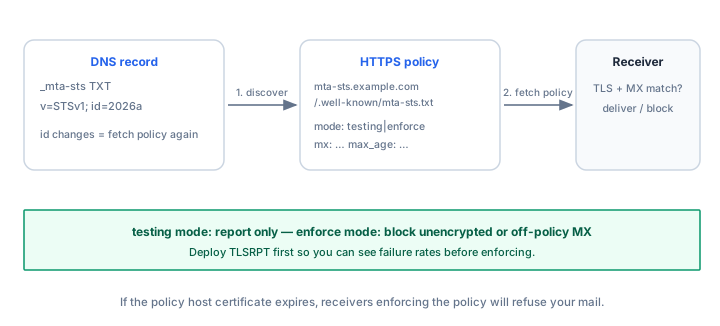
How MTA-STS works
A sending server checks DNS for your MTA-STS record, fetches the policy over HTTPS, caches it, and from then on refuses to deliver to your MX hosts unless the connection uses valid TLS. An attacker who blocks or strips STARTTLS no longer causes a fallback — the sender just retries, because policy says no TLS means no delivery. The policy fetch itself is protected by ordinary web HTTPS, which an on-path attacker cannot forge without your policy host's certificate.
Step 1: deploy TLSRPT first
TLSRPT is a single TXT record and costs nothing. Publish it before touching MTA-STS so you can see your baseline:
Host:   _smtp._tls.yourdomain.com
Type:   TXT
Value:  v=TLSRPTv1; rua=mailto:tlsrpt@yourdomain.com
The rua address receives daily aggregate reports — JSON documents summarizing TLS sessions. Each report counts successful deliveries and failed ones, broken down by receiving MX host and failure type: STARTTLS not supported, certificate expired, hostname mismatch, validation failure, and so on. The rua tag also accepts an https: URL if you would rather receive reports that way.
Watch the reports for a couple of weeks. A steady failure rate on one host means a certificate problem or a firewall stripping STARTTLS — fix it before enforcing, or your enforce policy will start rejecting that traffic.
Step 2: publish the MTA-STS DNS record
Host:   _mta-sts.yourdomain.com
Type:   TXT
Value:  v=STSv1; id=20261104T120000
The id is a short version label. Its only job is to change: sending servers re-fetch the policy when they notice the id in DNS differs from the one in their cached policy. Any time you edit the policy file, bump the id.
Step 3: host the policy file
The policy lives at a well-known HTTPS URL on a dedicated subdomain:
https://mta-sts.yourdomain.com/.well-known/mta-sts.txtThe file must contain:
version: STSv1
mode: testing
mx: mail1.yourdomain.com
mx: mail2.yourdomain.com
max_age: 86400- version is always STSv1.
- mode is one of enforce, testing or none.
- mx lists every MX hostname, one per line — the list must match your MX records or senders will refuse delivery to hosts missing from it.
- max_age is how long senders may cache the policy, in seconds — 86,400 (one day) while testing, up to a maximum of 31,557,600 (one year) once enforced.
The critical, often-missed requirement: the policy host must serve HTTPS with a valid, publicly trusted certificate. Senders will not fetch the policy over a broken or self-signed TLS connection, so your web PKI must be in order first.
testing versus enforce
In testing mode, senders behave as before — nothing is blocked — but every connection that would fail an enforced policy shows up in your TLSRPT reports.
In enforce mode, a sending server that cannot establish valid TLS to a listed MX host refuses to deliver. Mail queues and retries; if the problem persists, it bounces. Flip to enforce only when TLSRPT shows a near-zero failure rate over a sustained period, then raise max_age gradually — a long max_age means senders keep enforcing the old policy while you change things.
Operations: MX changes and certificate renewal
Two maintenance scenarios break mail when handled carelessly:
- MX migrations. Add the new MX host to the policy file (and bump the id) first, let it propagate for longer than your max_age, and only then change DNS MX records. Removing an old host is the reverse: cut it from DNS first, keep it in the policy, then drop it after max_age elapses. A host missing from a cached enforced policy gets its delivery refused outright.
- Certificate expiry. An expired certificate on a listed MX host makes enforcing senders refuse delivery — your inbound mail queues at other providers until it is fixed. Automate renewal for the policy host and every MX host. If the policy host's certificate expires, senders cannot refresh the policy; they keep the cached copy until max_age runs out, so the damage is slower but the clock is ticking.
Check your current records with the MX Lookup tool and the MTA-STS Lookup tool — the latter retrieves both the DNS record and the live policy file, and flags mismatches between your MX list and the policy.
Verify
After publishing both records, run the MTA-STS Lookup tool against your domain to confirm the DNS record resolves, the policy file fetches over valid HTTPS, and the mx lines match your real MX records. Then watch TLSRPT reports: the first testing-mode reports confirm the plumbing works; a daily success rate near 100% with no recurring failure types is the signal to raise max_age and eventually switch mode to enforce.
Common mistakes
- Going straight to enforce. Without TLSRPT history you cannot know which partners or firewalls break STARTTLS — enforcement turns their delivery failures into your problem, overnight.
- A stale mx list. Adding a mail server to DNS but not to the policy file means enforcing senders refuse to deliver to it. The mx list and your MX records must move together, policy first.
- Letting the policy host certificate lapse. A certificate that auto-renews for your website does not help the mta-sts subdomain you forgot to include in renewal.
- Never bumping the id. Editing the policy file without changing the id leaves senders on their cached policy, quietly ignoring your changes.
- A too-long max_age while testing. A long max_age makes it hard to correct mistakes — keep it to a day until you are confident, then extend it.
Frequently asked questions
Does MTA-STS encrypt my emails end to end?
No. It guarantees the SMTP hop between servers uses TLS with a valid certificate — defeating downgrade and interception on that hop. The receiving server still reads the message in the clear; end-to-end content protection is S/MIME or PGP territory.
What is the difference between MTA-STS and DANE?
Both enforce SMTP TLS. DANE (RFC 7672) uses DNSSEC to publish which TLSA certificate is trustworthy; MTA-STS uses ordinary DNS plus HTTPS with the web PKI. DANE is cryptographically stronger but requires DNSSEC on both sides; MTA-STS is far easier to deploy with any DNS provider — see the DNS provider setup guide.
Can MTA-STS break inbound mail?
Yes, that is its job: senders refuse delivery when TLS fails, so a broken certificate or a stripped-STARTTLS path turns into delayed or bounced mail instead of silent cleartext delivery. That is exactly why you deploy TLSRPT first and enforce only after the failure rate is known to be negligible.
How is this different from opportunistic TLS?
Opportunistic TLS is best-effort: if TLS fails for any reason, delivery falls back to cleartext without complaint. MTA-STS flips the default — TLS failure means no delivery — which is why downgrade attacks stop working against an enforced policy.
Do I need MTA-STS if I only receive mail?
MTA-STS protects inbound mail to your domain, so if you receive mail at all it applies — sending servers are the ones that fetch and honor your policy. If you also operate an outbound MTA, enforcing MTA-STS for the domains you deliver to is automatic: modern MTAs such as Postfix (with tls-policy-map), Exim and commercial gateways support it natively.
Related Tools
Need Help?
Our tools are designed to be intuitive, but if you need assistance, we're here to help.
About Our Tools
Professional-grade email and DNS diagnostic tools trusted by IT professionals worldwide.