
ARC (Authenticated Received Chain): What It Is and When You Need It
ARC (RFC 8617) is not another authentication method. How forwarders seal original SPF/DKIM results, how the chain works, and when you need it.
Email Blacklist Removal Guide: How to Check Your IP and Request Delisting
Check your sending IP against major email blocklists and request delisting from Spamhaus, Microsoft Outlook, Barracuda and SpamEatingMonkey, with official portals, request templates and a post-removal verification checklist.
Email Bounce Codes Explained: SMTP 4xx & 5xx
SMTP bounce codes explained: permanent 5xx vs temporary 4xx failures, what codes like 5.7.1, 5.7.26 and 4.7.1 mean, and how to fix each one.
Email Header Analysis: Reading Received Chains & Auth Results
Every email carries its own passport. The headers — the technical block above the body — record where a message originated, every server it passed through, and what each server thought of its SPF, DKIM and DMARC. When delivery is slow, when mail lands in spam, or when you suspect forgery, the answer is usually already written there.
This guide shows how to extract raw headers, then dissects a realistic example: the Received chain, the DKIM signature, and the Authentication-Results block — including the case where everything says pass and DMARC still fails.
What you need
- One message whose journey you want to understand — your own test send works best.
- Access to the client's "show original" or message source view.
- The Header Analyzer open for the tedious parts.
Getting the raw headers
- Gmail: open the message, use the three-dot menu, choose Show original. You get the full header block plus Google's authentication summary.
- Outlook: File > Properties on desktop, or View > View message source on the web.
- Other clients: look for "view source" or "view headers". If a client refuses, forward the message as an attachment.
A worked example
A synthetic header set for a message from newsletter@yourdomain.com to Gmail, trimmed to what matters:
Delivered-To: recipient@gmail.com
Return-Path: <bounces@mail.yourdomain.com>
Received: from mail.yourdomain.com (mail.yourdomain.com [203.0.113.10])
        by mx.google.com with ESMTPS id xyz789;
        Wed, 4 Nov 2026 10:03:20 +0000
Received: from mx.google.com (mx.google.com [203.0.113.20])
        by mx.google.com with SMTP id abc123
        for <recipient@gmail.com>; Wed, 4 Nov 2026 10:03:22 +0000
DKIM-Signature: v=1; a=rsa-sha256; d=yourdomain.com; s=sel2026;
        h=From:Subject:Date:To; bh=...; b=...
From: Newsletter <newsletter@yourdomain.com>
Authentication-Results: mx.google.com;
        spf=pass (sender IP is 203.0.113.10)
          smtp.mailfrom=mail.yourdomain.com;
        dkim=pass header.d=yourdomain.com header.s=sel2026;
        dmarc=pass header.from=yourdomain.com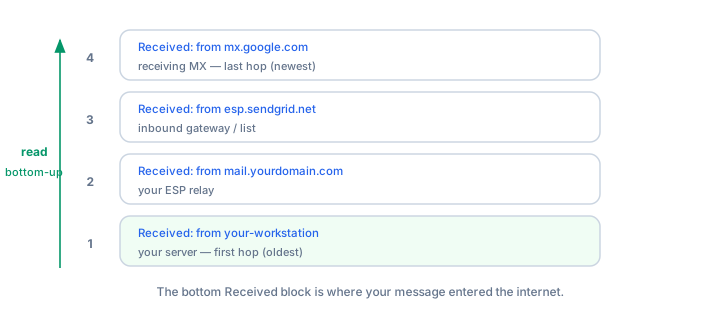
Reading the Received chain — bottom-up
Each server prepends its own Received line, so the chain reads in reverse: top is the last hop, bottom is the first. Trace the example upward: your server at 203.0.113.10 handed the message to Gmail's MX, which delivered it to the mailbox.
Each line answers three questions: who received (by), from whom (from, with a claimed hostname and bracketed IP), and when. The hostname is self-declared — only the bracketed IP is verifiable, which is why serious analysis resolves the IP, never the name.
Counting hops finds delays. Subtract consecutive timestamps to see which hop swallowed the time. A 40-minute gap between two lines indicts the server named in the earlier line's by field.
Return-Path and DKIM-Signature
Return-Path is the envelope sender — where bounces go, and what SPF evaluates. It often differs from the visible From address (bulk mail uses a bounce subdomain, as above); that difference is normal, not spoofing.
In DKIM-Signature, two tags matter: d= is the signing domain and s= is the selector naming the DNS key at <s>._domainkey.<d>. Here the domain signs its own mail, which is what DMARC alignment requires. If d= showed a vendor's domain while From shows yours, DKIM can pass with zero DMARC value. Test a selector with the DKIM Checker.
The Authentication-Results block
The final receiver writes one verdict per protocol: spf= against the Return-Path domain and connecting IP, dkim= against the signature's d=, and dmarc= for whether an aligned pass exists for the header.from domain.
The trap: pass but not aligned. You can see spf=pass and dkim=pass next to dmarc=fail. The passing domains belong to someone else — a bounce subdomain, a vendor — and neither matches From. The fix is never "make SPF pass harder"; it is making the passing domain match From. This is the most common DMARC failure; see the authentication guide.
Spotting forgery signs
- Reply-To disagrees with From. Your company's domain in From with a look-alike free mailbox in Reply-To is the classic business-email-compromise pattern.
- A broken or nonsensical Received chain. Real chains grow longer and later toward the top. Delivery before the send time, or a first hop from an unrelated country, deserves suspicion.
- Authentication-Results from the wrong party. Only the final receiver's verdict counts — check that the server named before the semicolon is really your provider.
- Missing DKIM. A domain that always signs, arriving unsigned, either broke in transit or never sent the message.
Verify with tooling
- Header Analyzer — parses the chain and flags anomalies automatically.
- DMARC Checker — inspects the policy behind any dmarc= verdict.
- MX Lookup — confirms the servers in the chain really are the domain's mail exchangers.
Common mistakes
- Reading the chain top-down. Headers are prepended; the newest hop is on top.
- Trusting claimed hostnames. Only the bracketed IP is evidence.
- Panicking over a From / Return-Path mismatch. Envelope and header senders differ by design.
- Treating any Authentication-Results as authoritative. Sender-side versions are claims, not verdicts.
Frequently asked questions
Can headers prove who sent an anonymous harassing message?
They narrow it down: the earliest trustworthy Received line and its IP identify the origin network. But sender-side headers can be forged. Treat analysis as evidence gathering and hand raw headers, not screenshots, to the provider or authorities.
Why does SPF pass while the message still lands in spam?
Authentication is table stakes, not a delivery guarantee. Reputation, engagement and content still decide placement. Use the deliverability test to see which factor is dragging.
What does shuffled timestamp order mean?
Seconds-level inversion is usually clock skew between servers. Minutes-level inversion toward the top usually means a forged line — genuine chains move forward in time.
Related Tools
Need Help?
Our tools are designed to be intuitive, but if you need assistance, we're here to help.
About Our Tools
Professional-grade email and DNS diagnostic tools trusted by IT professionals worldwide.