
263 Enterprise Mail: MX, SPF, DKIM & DMARC Setup
Configure 263 Enterprise Mail on a custom domain: mxw.263.net at priority 5, mx.263.net at 10, the spf.263.net include, DKIM generated in the admin console, and DMARC reporting.
Aliyun Mail & DirectMail: DKIM, SPF & DMARC Setup
Step-by-step Aliyun DirectMail sender domain verification: the six DNS records, the SPF include values, region-based DKIM selectors and DMARC publishing.
Alibaba Mail (Alimail) SPF, DKIM & DMARC Setup Guide
Configure Alibaba Mail / Aliyun Enterprise Mail on your own domain: mx1-mx3.qiye.aliyun.com, the spf.qiye.aliyun.com include, default._domainkey DKIM and a DMARC record.
Sina Enterprise Mail: SPF, DKIM & DMARC Configuration
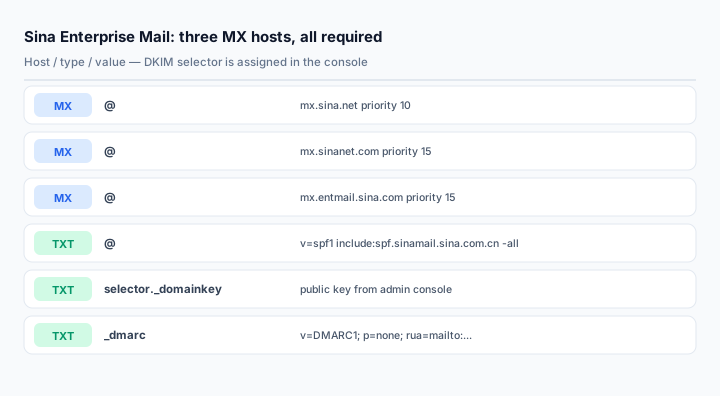
Sina Enterprise Mail (新浪企业邮箱) is one of the older hosted mailbox services in China, and its DNS layout reflects that age: three MX hosts, two of which share the same priority, and an SPF include that points at a domain most people guess wrong. If you copy a generic "add an MX record" tutorial, you will end up with a domain that receives some mail, loses the rest, and fails authentication on every outbound message.
This guide covers the records for a custom domain on Sina Enterprise Mail, the console path for DKIM, and the migration details that the sales documentation does not mention.
What you need
- A Sina Enterprise Mail tenant with your domain added in the enterprise admin console (企管后台).
- DNS write access to the authoritative zone. Sina also supports up to 20 custom domains per tenant, so confirm which one you are configuring.
- Administrator rights for the anti-spam section of the console, where DKIM and DMARC are generated.
Step 1: the three MX records
Point the root of the domain at Sina's inbound servers:
@    MX   10    mx.sina.net
@    MX   15    mx.sinanet.com
@    MX   15    mx.entmail.sina.com
Two hosts share priority 15. That is intentional — the sending server tries them in the order returned when the first host at priority 10 is unavailable. Keep all three. Publishing only mx.sina.net is the most common reason a Sina-hosted domain silently drops mail during a Sina-side maintenance window.
If you are migrating in from another provider, remove the old MX records in the same change. A leftover MX at priority 20 will keep attracting a share of inbound mail for as long as the record is cached, which can be days.
Step 2: SPF — where most people get it wrong
@ TXT v=spf1 include:spf.sinamail.sina.com.cn -allThe include is spf.sinamail.sina.com.cn. Not spf.sina.com, not sina.net, not spf.sina.net. All three appear in blog posts and all three authorize nothing, which produces a clean-looking SPF record that fails every check.
If the same domain also sends through another platform, merge the includes into a single record:
@ TXT v=spf1 include:spf.sinamail.sina.com.cn include:spf.other-provider.com -allTwo separate v=spf1 records at the apex cause a permanent SPF error. Receivers return permerror and treat the domain as having no valid policy at all.
Start with ~all for the first week after a migration, then tighten to -all once you have confirmed every legitimate sender is covered.
Step 3: DKIM from the admin console
Sina added DKIM and DMARC as a self-service feature rather than publishing a fixed selector. In the enterprise admin console, open 日常维护 > 反垃圾管理 and look for the DKIM/DMARC configuration entry. The page generates the host record and public key for your domain and shows the exact strings to publish.
Because the selector is assigned per tenant, do not hardcode a value from a tutorial. Publish what the console shows, which typically looks like:
<selector>._domainkey TXT v=DKIM1; k=rsa; p=MIIBIjANBg...Two practical notes:
- Copy the key without line breaks. Sina's console displays the key in a scrollable box; selecting it often picks up a newline. A key with a newline resolves but fails verification, and the error message from most checkers is unhelpfully generic.
- Enable signing after publishing. Publishing the DNS record only makes the public key available. The console has a separate switch or verification button that tells the mail system to start signing outbound messages. Domains that skip this step show a valid DKIM record and zero DKIM signatures in the headers.
If the console offers a key length choice, take 2048-bit. Reset the key if the tenant was created years ago and still uses 1024-bit.
Step 4: DMARC
_dmarc TXT v=DMARC1; p=none; rua=mailto:dmarc@yourdomain.com; fo=1Run monitoring for two to four weeks before enforcing. Sina's own template may suggest a stricter policy; ignore that until the reports show every legitimate source passing with alignment. The DMARC setup guide covers the tightening sequence and how to read the reports.
Optional: branded webmail and client hostnames
Sina provides fixed client hostnames, including separate ones for overseas users:
smtp.sina.net        port 25 / 465 (SSL)
imap.sina.net        port 143 / 993 (SSL)
pop3.sina.net        port 110 / 995 (SSL)
hwsmtp.sina.net      overseas SMTP
hwimap.sina.net      overseas IMAP
hwpop.sina.net       overseas POP3
For a branded login page, publish mail.yourdomain.com as a CNAME to p.mail.sina.net. This requires an ICP filing for the domain in mainland China; without it the branded page will not resolve to a working login. Note also that the free sinanet.com secondary domain bundled with the account cannot be deleted — it is a fallback address, not a temporary trial domain.
Verifying
Send from a Sina mailbox to a Gmail account and read the headers:
Authentication-Results: mx.google.com;
       spf=pass smtp.mailfrom=yourdomain.com;
       dkim=pass header.i=@yourdomain.com header.s=<selector>;
       dmarc=pass (p=NONE) header.from=yourdomain.com
All three passes. If SPF fails, check for a second v=spf1 record first, then the exact include hostname. If DKIM fails, compare the selector in the header with the one you published, then check the key for whitespace.
Use the MX lookup, SPF checker and DKIM checker to confirm each record independently.
Common mistakes
- Only one MX record. All three hosts are part of the service.
- SPF include guessed as
spf.sina.com. The correct host isspf.sinamail.sina.com.cn. - DKIM published but never enabled in the admin console, so nothing is signed.
- Two SPF records after adding a marketing platform.
- Expecting the bundled
sinanet.comaddress to disappear. It cannot be removed, and it should not be used as the primary identity for outbound mail.
Frequently asked questions
Why are two MX records at the same priority?
They are alternate gateways, not a primary and a backup. When the priority-10 host is unreachable, the sender works through the priority-15 hosts in the order the resolver returns them. Equal priority is valid and common in older Chinese mail infrastructure.
Can I use Sina Enterprise Mail with a domain hosted outside China?
Yes, but expect higher latency and possible filtering issues for inbound mail. Sina publishes separate overseas client hostnames (hwsmtp, hwimap, hwpop) for users outside mainland China; these affect client connections, not MX routing.
Does the DKIM selector change if I rotate the key?
It can. Regenerate in the console and republish whatever host record it shows. Do not assume the selector stays the same across a rotation — an old record left in place will keep validating old signatures and fail new ones.
Is a DMARC record required?
Not to receive mail, but Gmail and Yahoo bulk-sender rules effectively require it for any domain sending in volume, and Chinese receivers increasingly check it. Publish p=none at minimum, with a reporting address you actually read.
Related Tools
Need Help?
Our tools are designed to be intuitive, but if you need assistance, we're here to help.
About Our Tools
Professional-grade email and DNS diagnostic tools trusted by IT professionals worldwide.