
263 Enterprise Mail: MX, SPF, DKIM & DMARC Setup
Configure 263 Enterprise Mail on a custom domain: mxw.263.net at priority 5, mx.263.net at 10, the spf.263.net include, DKIM generated in the admin console, and DMARC reporting.
Aliyun Mail & DirectMail: DKIM, SPF & DMARC Setup
Step-by-step Aliyun DirectMail sender domain verification: the six DNS records, the SPF include values, region-based DKIM selectors and DMARC publishing.
Alibaba Mail (Alimail) SPF, DKIM & DMARC Setup Guide
Configure Alibaba Mail / Aliyun Enterprise Mail on your own domain: mx1-mx3.qiye.aliyun.com, the spf.qiye.aliyun.com include, default._domainkey DKIM and a DMARC record.
SendCloud Email Authentication: SPF, DKIM & DMARC Setup
SendCloud (赛邮) is the sending API most Chinese developers reach for when they need transactional mail without building an SMTP stack: password resets, order confirmations, invoices. It is a sending service, not a mailbox host. That distinction decides everything about the DNS setup — in particular, you do not change your root MX records.
If you are migrating from a marketing platform and your instinct is "add the records the panel shows", read the MX section before you do anything. Pointing a production domain's MX at a sending service takes down inbound mail for every employee.
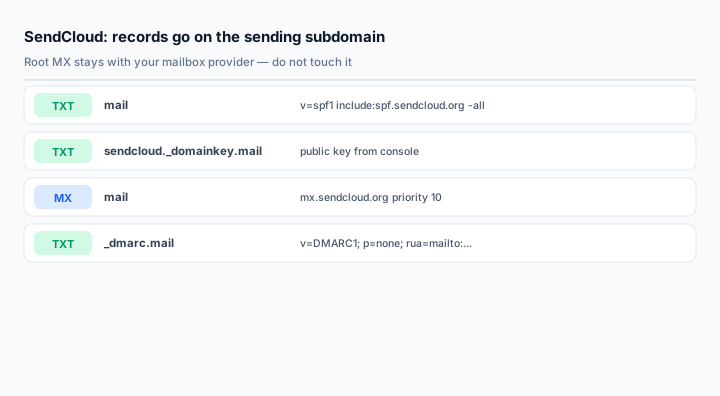
Use a subdomain, not the apex
The clean pattern is to send from mail.yourdomain.com or notify.yourdomain.com rather than yourdomain.com:
- Deliverability damage — a bad campaign, a compromised API key — is contained to the subdomain.
- SPF and DKIM records for the sending service do not collide with the mailbox provider's records.
- You can hand the subdomain to a marketing team without giving them access to the corporate domain.
Most SendCloud domains in production are subdomains for exactly these reasons. The console lets you add either.
Step 1: SPF for the sending domain
For the classic SendCloud service, the include is:
mail.yourdomain.com TXT v=spf1 include:spf.sendcloud.org -allAurora SendCloud, the international product line, documents include:sendcloud.org instead:
mail.yourdomain.com TXT v=spf1 include:sendcloud.org ~allThese are not interchangeable. Use the value shown in your account's domain configuration page — the console is the only authority for which product line your account sits on. Copying spf.sendcloud.org into an Aurora account produces an SPF record that never passes.
If the domain already has an SPF record (because it also sends through a CRM, for example), edit that record and insert the include before the all mechanism. Do not create a second v=spf1 record at the same hostname.
Step 2: DKIM
SendCloud issues a per-domain key. The host is normally:
sendcloud._domainkey TXT k=rsa; p=MIGfMA0GCSqGSIb3DQEBAQUAA4GNADCBiQKBgQ...Some accounts get a different selector, and the value can be a full v=DKIM1; k=rsa; p=... string or just the k=rsa; p=... portion — both forms are valid and both are accepted by receivers. Publish exactly what the console shows; do not normalise it yourself.
Two failure modes worth knowing:
- Truncated key. The console key is long. Copying it out of a browser selection often drops the last few characters, and every message then fails signature verification with no obvious hint.
- Wrong host. If the console gives
sendcloud._domainkey.mailfor a subdomain, publishingsendcloud._domainkeyat the apex puts the key where nobody looks.
After publishing, return to the console and click verify. SendCloud will not sign until the domain shows as verified.
Step 3: the MX record — read this before changing anything
SendCloud can receive mail for a domain, which is how bounce processing and reply handling work. The documented target is:
@ MX 10 mx.sendcloud.orgThat record belongs on the sending subdomain, not on your corporate apex, unless you have deliberately decided that SendCloud should also handle replies to your domain. For a company that already runs Alibaba Mail, Tencent Exmail or Microsoft 365 on the apex, pointing the apex MX at SendCloud breaks every employee inbox within the TTL window.
If bounce replies matter, the common compromise is to set a Return-Path or reply-to on the subdomain and leave the apex alone.
Step 4: DMARC
_dmarc TXT v=DMARC1; p=none; rua=mailto:dmarc@yourdomain.com; fo=1For a subdomain, publish at _dmarc.mail. DMARC inherits from the organizational domain when no subdomain policy exists, but an explicit subdomain record lets you apply a different policy to bulk sending without touching the corporate domain:
_dmarc.mail TXT v=DMARC1; p=quarantine; rua=mailto:dmarc@yourdomain.comThis is the strongest reason to separate sending onto a subdomain: you can enforce a strict policy on bulk mail while the corporate domain stays at p=none during its own rollout.
Verifying without sending a test campaign
Query the records directly:
dig +short TXT mail.yourdomain.com
dig +short TXT sendcloud._domainkey.mail.yourdomain.com
dig +short TXT _dmarc.mail.yourdomain.com
Then use the domain verification endpoint or the verify button in the console. SendCloud's API returns the expected SPF host and value alongside your configured records, which makes it easy to diff what they expect against what you published:
GET https://api.sendcloud.net/apiv2/domain/get
    ?apiUser=YOUR_API_USER&apiKey=YOUR_API_KEY&name=mail.yourdomain.com
The response includes spf.domain, spf.value, dkim.domain, dkim.value, mx.domain and mx.value. Compare those strings to your zone — not to this article.
Finally, send one real message and read the headers at the receiving end. All three of SPF, DKIM and DMARC should pass, and the DKIM d= domain should be the sending subdomain.
Common mistakes
- Pointing the root MX at SendCloud. This takes down inbound mail for the whole company.
- Using the Aurora include on a classic account, or the reverse.
- Adding a second SPF record instead of editing the existing one.
- Publishing DKIM but never verifying the domain, so nothing is signed.
- Sending from the apex because it looks better, then discovering you cannot enforce DMARC on bulk mail without risking transactional mail from other systems.
Frequently asked questions
Do I need an MX record if I only send?
No. If you do not need bounce messages delivered to a mailbox you control, skip the MX and rely on the console's bounce webhook or the Return-Path. Publishing an MX you do not use only creates a way to lose mail.
Can the same subdomain be used by SendCloud and a mailbox provider?
Not for receiving. For sending, yes — as long as all the sending services are in the same SPF record and each has its own DKIM selector. Splitting sending and receiving across different hostnames is cleaner.
Why does SPF pass but DMARC still fail?
Alignment. SPF validates the envelope sender (MailFrom), while DMARC checks that domain against the visible From header. A sending service that uses its own bounce domain for the envelope passes SPF and fails alignment. DKIM signing with your domain is what fixes it.
How long should I stay at p=none?
Two to four weeks for a domain with existing traffic, longer if you have never collected reports before. Move to quarantine only after the reports show every legitimate source aligned and passing.
Related Tools
Need Help?
Our tools are designed to be intuitive, but if you need assistance, we're here to help.
About Our Tools
Professional-grade email and DNS diagnostic tools trusted by IT professionals worldwide.