
263 Enterprise Mail: MX, SPF, DKIM & DMARC Setup
Configure 263 Enterprise Mail on a custom domain: mxw.263.net at priority 5, mx.263.net at 10, the spf.263.net include, DKIM generated in the admin console, and DMARC reporting.
Aliyun Mail & DirectMail: DKIM, SPF & DMARC Setup
Step-by-step Aliyun DirectMail sender domain verification: the six DNS records, the SPF include values, region-based DKIM selectors and DMARC publishing.
Alibaba Mail (Alimail) SPF, DKIM & DMARC Setup Guide
Configure Alibaba Mail / Aliyun Enterprise Mail on your own domain: mx1-mx3.qiye.aliyun.com, the spf.qiye.aliyun.com include, default._domainkey DKIM and a DMARC record.
NetEase Enterprise Mail (163/126): SPF, DKIM & DMARC
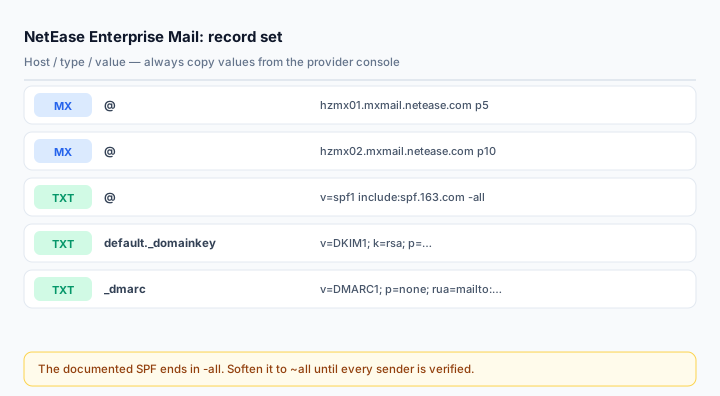
NetEase Enterprise Mail (网易企业邮箱, qiye.163.com) is one of the oldest enterprise mailbox services in China and still common in manufacturing, trading and government-adjacent companies. Its DNS setup is small — two MX records and two TXT records — but the vendor's own template is stricter than most domains can survive on day one, and that is where setups break.
This guide covers the mailbox product only, not NetEase's bulk-sending services.
What you need
- Administrator access to the enterprise service platform, with your domain already added under 组织机构管理 > 域名管理.
- The verification values the console shows for your domain. NetEase generates a per-domain ownership TXT; you cannot copy one from another account.
- DNS write access at the real authoritative host. Confirm with
dig NS yourdomain.com +shortbefore editing anything. - An inventory of other senders: the company website's contact form, an ERP, WeChat Work integrations.
Step 1: MX records
@   MX   5    hzmx01.mxmail.netease.com
@   MX   10   hzmx02.mxmail.netease.com
Both hosts are required, and every other MX record on the domain should go. Some NetEase tenants are provisioned with regional hosts (the console may show hzmx01 and hzmx02 for a Hangzhou cluster, or a different pair for another region) — always use the pair the console prints for your tenant rather than the pair in any article, including this one.
If you are migrating from another provider, do this in the right order: create the mailboxes and verify them first, then switch MX. Switching MX before the accounts exist means inbound mail is accepted by NetEase and then bounced as unknown recipient, and the sender sees a hard failure.
Step 2: SPF
NetEase's documented value is:
v=spf1 include:spf.163.com -allNote the -all. That is a hard fail: any server not covered by the include is rejected outright. On a domain where the mailbox provider is the only sender, that is correct and desirable. On a domain where a website form, a CRM or a scanner also sends mail, -all silently kills those messages — and because the rejection happens at the recipient, nobody in your company sees a bounce.
If you are not certain the inventory is complete, start with soft fail and tighten later:
v=spf1 include:spf.163.com ~allThen merge additional senders into the same record. Never publish a second v=spf1 record — multiple SPF records are a permanent error and receivers treat the domain as unauthenticated, which is strictly worse than a permissive single record:
v=spf1 include:spf.163.com include:_spf.google.com include:spf.protection.outlook.com ~allStep 3: DKIM
NetEase publishes DKIM under the default selector, so the host is:
default._domainkey.yourdomain.com TXT v=DKIM1; k=rsa; p=MIIBIjANBg...The public key is generated per domain and shown in the console — under the domain's DNS or security settings, depending on which version of the platform you are on. Copy the whole value; do not reformat it, do not add quotes, and do not let a text editor wrap it into two lines. A 2048-bit key is roughly 400 characters and most DNS panels handle that fine, but panels that still enforce the 255-character single-string limit need the value split into quoted chunks inside one record.
For a subdomain, the host record keeps the subdomain label: publishing DKIM for mail.yourdomain.com means default._domainkey.mail, not default._domainkey. Getting this wrong is the single most common reason a subdomain never verifies.
Confirm with:
dig TXT default._domainkey.yourdomain.com +shortStep 4: DMARC — do not copy the vendor template verbatim
NetEase's help centre shows this record:
v=DMARC1; p=quarantine; fo=1; ruf=mailto:dmarc@qiye.163.com; rua=mailto:dmarc_report@qiye.163.comTwo problems with using it as-is. First, p=quarantine is an enforcement policy: any message failing alignment goes to spam, including your own forgotten senders. Second, both reporting addresses belong to NetEase, so you get a vendor summary rather than the raw aggregate reports that tell you which IP failed.
Start here instead:
v=DMARC1; p=none; rua=mailto:dmarc@yourdomain.com; fo=1Feed the reports into the DMARC Report Analyzer and watch for two weeks. Once every sender is aligned, move to p=quarantine, then p=reject. If you want to keep NetEase's copy of the reports, add their address as a second rua — multiple comma-separated addresses are allowed.
Step 5: Verify with a real message
Send from a NetEase mailbox to a Gmail account and inspect the original. Three lines matter:
spf=pass (spf.163.com designates <sending IP> as permitted)
dkim=pass header.d=yourdomain.com
dmarc=pass (p=NONE) header.from=yourdomain.com
A dkim=pass with d=163.com is a pass that does not count — the message is signed, but by NetEase's domain, so it cannot satisfy DMARC alignment for yours. That symptom almost always means the DKIM TXT was never published, or was published at the wrong host.
Check the published side with the SPF Checker, DKIM Checker and MX Lookup.
Common mistakes
- Using
include:spf.qiye.163.com. Third-party blogs repeat it; NetEase's own documentation usesspf.163.com. Publish the documented value. - Copying
-allandp=quarantineon day one, then losing website enquiry mail without a single bounce reaching anyone. - Forgetting the subdomain label in the DKIM host record.
- Leaving the old provider's MX records in place during a migration window.
- Two SPF records after adding a marketing platform — merge, never append a new row.
Frequently asked questions
Is the NetEase selector always "default"?
For the standard DKIM setup, yes — the host is default._domainkey. Confirm against the value shown in your console before publishing, and verify with a live header check afterwards rather than assuming.
Can I use one SPF record for both NetEase mailboxes and a marketing platform?
You must. One record per domain, every sender merged in. If the combined lookup count approaches 10, flatten the low-value includes or move marketing to a subdomain with its own SPF record.
Why does mail from my domain still land in spam with all three records passing?
Authentication is a gate, not a ranking signal on its own. A brand-new domain, a shared sending IP with a poor reputation, or content that triggers filters will still be filtered. Work through the spam diagnosis guide; changing DNS again will not help.
Related Tools
Need Help?
Our tools are designed to be intuitive, but if you need assistance, we're here to help.
About Our Tools
Professional-grade email and DNS diagnostic tools trusted by IT professionals worldwide.