
263 Enterprise Mail: MX, SPF, DKIM & DMARC Setup
Configure 263 Enterprise Mail on a custom domain: mxw.263.net at priority 5, mx.263.net at 10, the spf.263.net include, DKIM generated in the admin console, and DMARC reporting.
Aliyun Mail & DirectMail: DKIM, SPF & DMARC Setup
Step-by-step Aliyun DirectMail sender domain verification: the six DNS records, the SPF include values, region-based DKIM selectors and DMARC publishing.
Alibaba Mail (Alimail) SPF, DKIM & DMARC Setup Guide
Configure Alibaba Mail / Aliyun Enterprise Mail on your own domain: mx1-mx3.qiye.aliyun.com, the spf.qiye.aliyun.com include, default._domainkey DKIM and a DMARC record.
Proton Mail Custom Domain: SPF, DKIM & DMARC Setup
Proton Mail is the one mailbox provider on this list where the DNS setup is genuinely unlike everyone else's: DKIM is published as three CNAME records pointing into Proton's signing infrastructure, and the public keys never touch your zone. It also has a hard prerequisite most guides bury — custom domains require a paid plan, and the free tier cannot use one at all.
There is a second constraint worth knowing before you start: Proton is a mailbox, not a sending platform. It has no bulk API and, outside Business plans with SMTP submission enabled, no relay for your application. If you need transactional mail, keep that on a separate subdomain with an ESP.
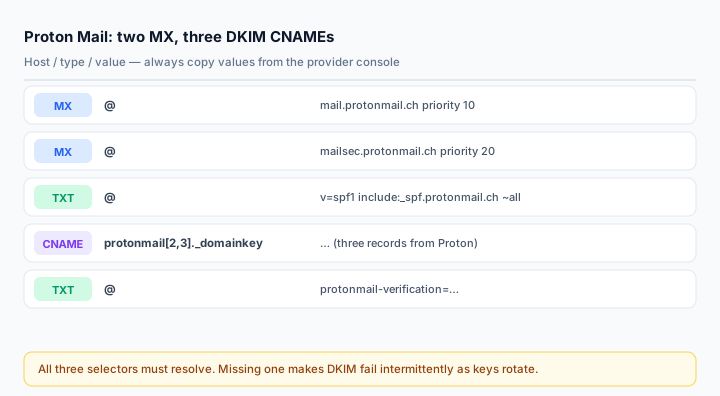
What you need
- A paid Proton plan (Mail Plus or above, or a Business plan). All paid plans support custom domains.
- Domain access at Settings > Domain names > Add domain in the Proton account.
- DNS write access. Proton publishes per-registrar walkthroughs for Cloudflare, Namecheap, GoDaddy, OVH, Gandi, AWS, Squarespace, Wix, Porkbun, Bluehost and Hostpoint — if yours is on that list, use it for the exact field names.
- All destination addresses created before you switch MX. Mail for an address that does not exist in Proton bounces once the MX moves.
Step 1: Verify ownership
Adding the domain produces a TXT record at the root:
@ TXT protonmail-verification=xxxxxxxxxxxxxxxxPublish it, wait a few minutes, then click through the verification step. Some panels reject @ as a host value — leave the field empty in that case, or enter the bare domain if the panel demands it. A wrong host here produces a record at @.yourdomain.com that nothing will ever query, and the console will simply say verification failed.
This record can stay after verification; it costs nothing and proves ownership if you ever need to re-verify.
Step 2: MX records
@   MX   10   mail.protonmail.ch
@   MX   20   mailsec.protonmail.ch
Delete any other MX records, or make sure Proton's have the lowest priority numbers. Lower number means higher priority, which is the opposite of what most people assume — a domain left with an old MX at priority 10 and Proton at 20 will keep delivering to the old provider, and Proton's console will show a red MX indicator.
Do not switch MX until every address exists in Proton. This is the single most common way people lose mail during a Proton migration.
Step 3: SPF
v=spf1 include:_spf.protonmail.ch ~allSome of Proton's older registrar guides also include an mx mechanism (v=spf1 include:_spf.protonmail.ch mx ~all). It authorises whatever your MX records point at, which is redundant when the MX is Proton and actively wrong if you later point MX elsewhere. Use the include-only form unless Proton's console for your account shows otherwise.
If an SPF record already exists, edit it — one record per domain, includes merged:
v=spf1 include:_spf.protonmail.ch include:_spf.google.com ~allStep 4: DKIM — three CNAMEs, not one
Proton uses three selectors so keys can rotate without a gap:
protonmail._domainkey    CNAME   <value from Proton>
protonmail2._domainkey   CNAME   <value from Proton>
protonmail3._domainkey   CNAME   <value from Proton>
Each target points at a hostname inside Proton's DKIM zone, and the value differs per record. Copy all three verbatim from Settings > Domain names > your domain > DKIM. Publishing only the first one is the most common partial failure: mail may still be signed with a selector you did not publish, and verification then depends on which key Proton happens to use.
Three practical notes:
- No trailing dot problems. If your panel adds one, keep it; if it rejects values ending in a dot, remove it. Both forms resolve identically once stored correctly.
- No TXT at the same host. A CNAME cannot coexist with any other record. If a previous provider left a TXT at
protonmail._domainkey, delete it first. - No proxying. On Cloudflare all three must be DNS only. A proxied CNAME returns an edge address and the signature check fails.
Proton's console shows a green check per record once it resolves. That check is Proton's own resolver, not the world's — confirm independently:
dig CNAME protonmail._domainkey.yourdomain.com +short
dig CNAME protonmail2._domainkey.yourdomain.com +short
dig CNAME protonmail3._domainkey.yourdomain.com +short
Step 5: DMARC
Proton recommends p=quarantine for most domains, and unlike most providers it is a reasonable default here — Proton's own sending is fully aligned, so anything failing alignment is genuinely suspicious. Still, if the domain has other senders, monitor first:
v=DMARC1; p=none; rua=mailto:dmarc@yourdomain.com; fo=1Then tighten. Use the DMARC Report Analyzer to read the reports. If you want to go straight to quarantine, run p=none for at least a week first and confirm that no legitimate source is failing.
Step 6: Verify
Send from the Proton address to Gmail and read the original:
spf=pass (_spf.protonmail.ch designates <IP> as permitted)
dkim=pass header.d=yourdomain.com header.s=protonmail
dmarc=pass (p=QUARANTINE) header.from=yourdomain.com
If DKIM shows d=protonmail.ch, the message was signed with Proton's own domain — the CNAMEs are missing or not resolving. Check each selector with the DKIM Checker, and the SPF side with the SPF Checker.
Common mistakes
- Publishing only one of the three DKIM CNAMEs.
- Switching MX before creating all addresses, then losing the mail sent in between.
- Assuming the free plan supports custom domains. It does not.
- Leaving an old MX record at a lower priority number than Proton's.
- Using Proton as the sender for application mail. Outside Business SMTP submission, there is no relay; use an ESP on a subdomain.
Frequently asked questions
Do I need all three DKIM records?
Yes. Proton rotates between the three selectors. Miss one and a share of your outbound mail will fail DKIM whenever that key is in use, which looks like an intermittent, maddening failure.
Can I add several custom domains?
Yes, on paid plans, each with its own MX-independent address set and its own three DKIM records. Each domain needs the full record set — you cannot reuse one domain's selector values on another.
Does Proton support catch-all addresses?
Yes, catch-all is available per domain in the domain settings. Worth enabling during migration so mail to addresses you forgot to create does not bounce.
Related Tools
Need Help?
Our tools are designed to be intuitive, but if you need assistance, we're here to help.
About Our Tools
Professional-grade email and DNS diagnostic tools trusted by IT professionals worldwide.