
263 Enterprise Mail: MX, SPF, DKIM & DMARC Setup
Configure 263 Enterprise Mail on a custom domain: mxw.263.net at priority 5, mx.263.net at 10, the spf.263.net include, DKIM generated in the admin console, and DMARC reporting.
Aliyun Mail & DirectMail: DKIM, SPF & DMARC Setup
Step-by-step Aliyun DirectMail sender domain verification: the six DNS records, the SPF include values, region-based DKIM selectors and DMARC publishing.
Alibaba Mail (Alimail) SPF, DKIM & DMARC Setup Guide
Configure Alibaba Mail / Aliyun Enterprise Mail on your own domain: mx1-mx3.qiye.aliyun.com, the spf.qiye.aliyun.com include, default._domainkey DKIM and a DMARC record.
Shopify Email Authentication: Sender Domain, DKIM & DMARC
Shopify sends two very different kinds of mail from your store: transactional notifications (order confirmation, shipping, refund) and marketing campaigns from Shopify Email. Both claim to come from your sender address, and both are subject to the same authentication rules Gmail and Yahoo tightened in February 2024.
If authentication is not in place, Shopify does not fail loudly. It rewrites your sender address to something like store+12345678@shopifyemail.com so the mail can still be delivered. Customers then see a strange address instead of your brand, reply-to breaks, and the mail lands in Promotions or spam. This is the single most common "Shopify email is broken" complaint, and the fix is DNS, not support tickets.
What you need
- Shopify admin access to Settings > Notifications.
- DNS access for the domain in your sender address — the apex, not a subdomain, unless you set the sender up on one deliberately.
- An existing mailbox for that domain. Shopify is not an email host: it does not receive replies and must not be pointed at your MX.
Step 1: Understand what Shopify actually asks for
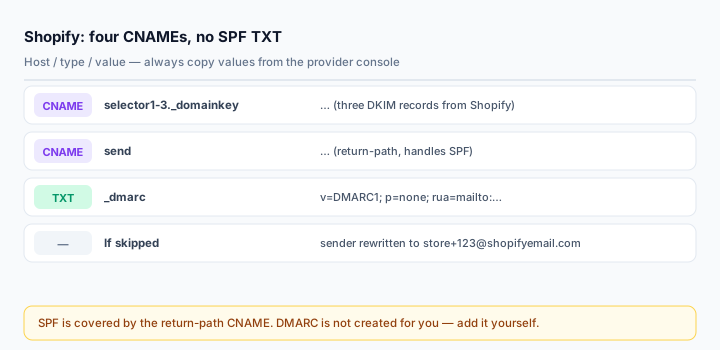
Shopify does not give you an SPF string or a raw DKIM key. It gives you four CNAME records:
- Three DKIM selectors pointing at Shopify's rotating key infrastructure.
- One return-path CNAME that handles SPF alignment.
Because the SPF authorisation lives behind a CNAME on a subdomain, you do not add a separate SPF TXT record for Shopify. This surprises people who expect to paste include:shopify.com. Shopify's documentation states it plainly: the CNAME records handle SPF for your sender address automatically.
Real consequence: if you already have an SPF record for Google Workspace or Microsoft 365, you leave it alone. Shopify is not in it and does not need to be. Your mailbox provider's SPF keeps covering your mailbox; Shopify's CNAME covers Shopify.
Step 2: Authenticate the domain
- Shopify admin → Settings > Notifications.
- In the Sender email section, enter the address you want customers to see.
- Click Email domain authentication.
- Choose Authenticate automatically if your DNS is on Cloudflare, GoDaddy or IONOS — Shopify can write the records through the provider's API.
- Otherwise choose manual, and add the four CNAME records it displays at your DNS host, copying host and target exactly.
Domains bought through Shopify are configured automatically; nothing to do there.
Two panel-specific notes, because these are where manual setups fail:
- Cloudflare: all four CNAMEs must be DNS only. Proxied records resolve to Cloudflare edge addresses and Shopify's verification will never see its own infrastructure.
- Host fields: enter the prefix Shopify gives you, not the full hostname, unless your panel explicitly requires the full form. A doubled domain is the classic silent failure.
Step 3: Add DMARC yourself
Shopify's automatic authentication sets up DKIM and SPF but does not create a DMARC record — its documentation says so explicitly. Without one, Gmail's bulk-sender requirements are not met and your domain stays spoofable.
_dmarc.yourdomain.com TXT v=DMARC1; p=none; rua=mailto:dmarc@yourdomain.com; fo=1Start at p=none. Read reports with the DMARC Report Analyzer for two weeks, confirm that Shopify's stream and your mailbox both pass aligned, then move to quarantine and eventually reject.
Why DKIM is doing all the work here
For Shopify's transactional mail, the envelope sender (Return-Path) points at Shopify's own mail infrastructure, not at your domain. SPF is evaluated against the envelope domain, so SPF alignment with your From domain fails by default — the mail still passes SPF, it just does not align.
DMARC passes if either SPF or DKIM aligns. Since SPF does not, everything rests on DKIM. If one of those three DKIM CNAMEs is missing or broken, order confirmations fail DMARC entirely and start landing in spam — while the Shopify admin still shows the domain as authenticated because the other records resolve.
This is why you verify with a real message rather than a green check.
Step 4: Verify
Place a test order (or use Shopify's test notification), then open the received message in Gmail and choose Show original:
spf=pass (shopify.com designates <IP> as permitted)
dkim=pass header.d=yourdomain.com
dmarc=pass (p=NONE) header.from=yourdomain.com
Then look at the From line itself. If it reads store+12345678@shopifyemail.com, authentication did not take effect and Shopify rewrote it. That rewrite is the signal to check the CNAMEs, not to contact support.
Cross-check the published side with the DKIM Checker on each selector Shopify gave you, and the Email Health Check for the domain-wide view.
Common mistakes
- Adding an SPF TXT record for Shopify. Not required, and it costs you a DNS lookup against the 10-lookup limit for nothing.
- Proxying the CNAMEs on Cloudflare.
- Skipping DMARC because Shopify's automatic flow "handled it". It does not.
- Pointing MX at Shopify. Shopify is not a mailbox; inbound mail must keep going to your real provider.
- Authenticating the domain but sending from a free mailbox. A
@gmail.comsender address is unauthenticated regardless of your domain records.
Frequently asked questions
Will this also authenticate Klaviyo or Omnisend mail?
No. Each platform authenticates through its own records. Shopify's CNAMEs only cover mail Shopify sends. Your ESP gets its own DKIM selector and, depending on how it sends, either an SPF include or a return-path CNAME.
Do I need a separate subdomain for Shopify?
Not required, but for stores with heavy marketing volume it is worth it: authenticate mail.yourdomain.com for Shopify and keep the apex for staff mail, so a bad campaign cannot damage the reputation of your order confirmations.
The admin says authenticated but mail still lands in spam
Authentication is a gate, not a score. Check DKIM alignment on an actual message first; if it passes, the problem is content, complaint rate or sending history — work through the spam guide.
Related Tools
Need Help?
Our tools are designed to be intuitive, but if you need assistance, we're here to help.
About Our Tools
Professional-grade email and DNS diagnostic tools trusted by IT professionals worldwide.