
263 Enterprise Mail: MX, SPF, DKIM & DMARC Setup
Configure 263 Enterprise Mail on a custom domain: mxw.263.net at priority 5, mx.263.net at 10, the spf.263.net include, DKIM generated in the admin console, and DMARC reporting.
Aliyun Mail & DirectMail: DKIM, SPF & DMARC Setup
Step-by-step Aliyun DirectMail sender domain verification: the six DNS records, the SPF include values, region-based DKIM selectors and DMARC publishing.
Alibaba Mail (Alimail) SPF, DKIM & DMARC Setup Guide
Configure Alibaba Mail / Aliyun Enterprise Mail on your own domain: mx1-mx3.qiye.aliyun.com, the spf.qiye.aliyun.com include, default._domainkey DKIM and a DMARC record.
Mailjet SPF, DKIM & DMARC Setup (Transactional & Campaigns)
Mailjet (now part of Sinch) is used for both transactional relays and marketing campaigns, and the same sending domain serves both. Authentication is therefore not optional: one unauthenticated stream drags down the reputation of the other, and since Mailjet's shared IPs are shared with every other customer, DKIM alignment is the only thing tying delivery reputation to your name.
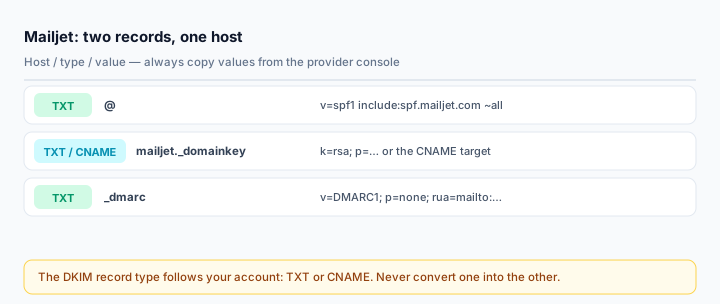
Setup is two records. The friction is in the details — the record type for DKIM varies by account generation, and the value is long enough that bad copy/paste is the norm rather than the exception.
What you need
- A Mailjet account with the sending domain added under Account Settings > Domains and Senders.
- DNS write access. If you are on Cloudflare, read the Cloudflare DNS guide first — proxying is the usual failure mode there.
- An existing SPF record if you already send from Google Workspace, Microsoft 365 or another ESP. You will merge, not add.
Step 1: Add the domain in Mailjet
Go to Account Settings > Domains and Senders > Setup SPF/DKIM authentication, click the gear icon next to your domain, and choose Setup SPF/DKIM Authentication. Mailjet shows the exact records for your account — those values are authoritative, not the ones in this article.
Decide now whether you authenticate the apex or a subdomain. Transactional and marketing mail on separate subdomains (mail.yourdomain.com, news.yourdomain.com) is worth the extra ten minutes: a campaign complaint wave then damages a subdomain's reputation rather than the domain your invoices come from.
Step 2: SPF
v=spf1 include:spf.mailjet.com ~allIf a record already exists, merge the include into it:
v=spf1 include:_spf.google.com include:spf.mailjet.com ~allTwo things that break here more often than anywhere else:
- A second
v=spf1record. Mailjet's dashboard will show SPF as failing with no useful explanation, and receivers treat the domain as permanently unauthenticated. There is exactly one SPF record per hostname. - The lookup budget. Each
includecosts a DNS lookup against a hard limit of 10. Mailjet plus Google Workspace plus a CRM plus a helpdesk is already 4–6; add a few more and SPF returnspermerroreven though every individual record looks fine. Check the count with the SPF Checker.
Step 3: DKIM
The host is always:
mailjet._domainkey.yourdomain.comThe value starts with k=rsa; p= followed by the public key. Whether the record type is TXT or CNAME depends on which flow your account shows: older accounts get a TXT record containing the key itself, while the newer setup screen presents a CNAME to Mailjet's managed zone. Read the type from the dashboard and copy it — do not convert one into the other.
If it is a TXT record:
- Paste the whole value as one line. A key wrapped across two lines parses as garbage and Mailjet will keep reporting DKIM as unverified.
- Do not add surrounding quotes in a panel that quotes values for you. On Cloudflare, GoDaddy and Namecheap the quotes become literal characters and the record no longer starts with
k=rsa. - A 2048-bit key is roughly 400 characters. Panels that enforce a 255-character single string need it split into quoted chunks inside one record; most modern panels handle this server-side.
If it is a CNAME, the target points at Mailjet's signing infrastructure and rotation is handled for you. On Cloudflare it must be set to DNS only — a proxied CNAME resolves to an edge IP and DKIM verification fails with no obvious clue.
After publishing, return to Mailjet and refresh the domain status. Both SPF and DKIM should turn green. Propagation is stated as up to 48 hours; in practice minutes to a couple of hours, unless your TTL is a day.
Step 4: DMARC
v=DMARC1; p=none; rua=mailto:dmarc@yourdomain.com; fo=1Two weeks of monitoring, then p=quarantine, then p=reject. Read reports with the DMARC Report Analyzer.
A specific Mailjet consideration: SPF alignment depends on the envelope-from (Return-Path) domain, which Mailjet controls. It usually aligns, but not always, depending on your account configuration and whether you use a custom bounce domain. DKIM alignment is the reliable half, which is exactly why a missing DKIM record is so damaging here — with DKIM broken you are one envelope mismatch away from failing DMARC entirely.
Step 5: Verify with a real send
Send a test through the API or SMTP (in-v3.mailjet.com, port 587 or 465) to a Gmail address, then open Show original:
spf=pass (spf.mailjet.com designates <IP> as permitted)
dkim=pass header.d=yourdomain.com
dmarc=pass (p=NONE) header.from=yourdomain.com
A dkim=pass with d=mailjet.com means Mailjet signed with its own domain — your record is missing, or published at the wrong host. That is a pass that does not count for DMARC.
Check the published side with the DKIM Checker (selector mailjet) and the SPF Checker.
Common mistakes
- Two SPF records after adding Mailjet alongside an existing mailbox provider.
- Pasting the DKIM key with line breaks or trailing spaces from the Mailjet dashboard.
- Quoting the value manually in panels that already quote it.
- Proxying the CNAME on Cloudflare.
- Authenticating only the campaign domain and leaving transactional mail — password resets, receipts — signed by Mailjet's own domain.
Frequently asked questions
Do I need a separate sender domain for Mailjet?
Not required, but recommended. A subdomain isolates Mailjet's reputation from your mailbox provider's, and lets you apply a stricter DMARC policy to the marketing stream without risking business mail.
Mailjet says DKIM is not verified but the record looks right
Query it directly: dig TXT mailjet._domainkey.yourdomain.com +short. If the value is truncated, the panel split it incorrectly. If it returns nothing, you edited a zone that is not authoritative. If it returns a value with quotes inside, remove them.
Does Mailjet support 4096-bit DKIM?
Mailjet issues the key pair, so the length is whatever your account generates. Do not try to replace it with your own — the private half lives on their side.
Related Tools
Need Help?
Our tools are designed to be intuitive, but if you need assistance, we're here to help.
About Our Tools
Professional-grade email and DNS diagnostic tools trusted by IT professionals worldwide.