
263 Enterprise Mail: MX, SPF, DKIM & DMARC Setup
Configure 263 Enterprise Mail on a custom domain: mxw.263.net at priority 5, mx.263.net at 10, the spf.263.net include, DKIM generated in the admin console, and DMARC reporting.
Aliyun Mail & DirectMail: DKIM, SPF & DMARC Setup
Step-by-step Aliyun DirectMail sender domain verification: the six DNS records, the SPF include values, region-based DKIM selectors and DMARC publishing.
Alibaba Mail (Alimail) SPF, DKIM & DMARC Setup Guide
Configure Alibaba Mail / Aliyun Enterprise Mail on your own domain: mx1-mx3.qiye.aliyun.com, the spf.qiye.aliyun.com include, default._domainkey DKIM and a DMARC record.
Feishu (Lark) Mail: Custom Domain, SPF & DKIM Setup
Feishu Mail (飞书邮箱) is bundled with the Feishu / Lark collaboration suite, and for companies already living in Feishu it is the cheapest way to get name@company.com. The DNS setup is unusual in two ways: it wants three MX records, and it refuses to validate while any other MX record exists on the domain — including a leftover one from the provider you are migrating away from.
Lark (the international version) uses different hostnames and a different SPF include than Feishu's China service. Check which one your tenant is on before copying values.
What you need
- Super administrator rights, or an admin with the Mail permission, in the Feishu admin console.
- The domain added under 产品设置 > 邮箱 > 域名管理.
- DNS access at the authoritative host. If your domain is on Alibaba Cloud DNS, DNSPod, Huawei Cloud DNS or GoDaddy, Feishu publishes step-by-step articles for each — use them, since the host-field conventions differ.
- A plan for inbound mail during the cutover: once MX moves, anything not in Feishu bounces.
Step 1: MX records — three of them, and nothing else
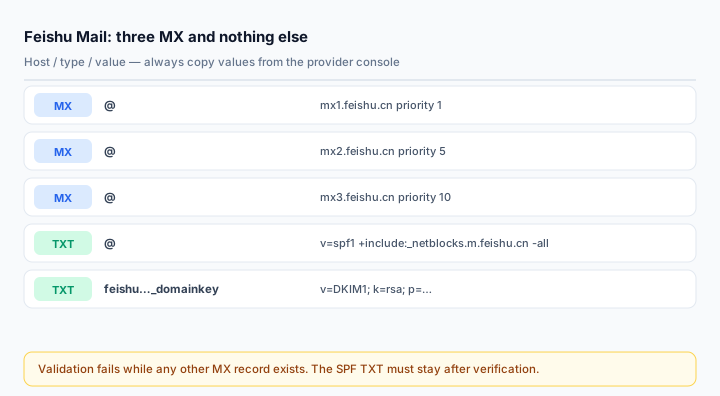
@   MX   1    mx1.feishu.cn
@   MX   5    mx2.feishu.cn
@   MX   10   mx3.feishu.cn
Priorities 1, 5 and 10 give Feishu an ordered failover chain. All three are required; publishing only the first one works until it does not.
Then delete every other MX record. Feishu's validation explicitly checks that no competing MX exists — a domain still pointing at an old provider will fail verification even though the three Feishu records are present and correct. This is the most common blocker reported with Feishu mail, and it looks like "the console will not verify" rather than an obvious error.
If you are migrating, do it in Feishu's two-phase flow: during 邮箱搬家 the original provider keeps receiving mail while messages sync across, and only at the end do you replace MX. Cutting MX first abandons every message sent during the migration window.
Step 2: SPF
For the Feishu China service the documented value is:
v=spf1 +include:_netblocks.m.feishu.cn -allFor Lark (international), the include is spf.onlarksuite.com:
v=spf1 +include:spf.onlarksuite.com -allThe + in front of include is redundant — it is the default qualifier — but Feishu prints it that way, and keeping the string identical to the console avoids second-guessing during verification.
Two things to watch:
-allis a hard fail. Any sender not in the include is rejected. If a website form, an ERP or a scanner also sends as this domain, either merge its include in or soften the qualifier to~allwhile you finish the inventory.- The SPF TXT must stay. Feishu's console shows two TXT records during setup: a
verification-code-site-App_...record for ownership, and the SPF record. The verification record can be deleted after the domain is verified; the SPF record cannot. Deleting it silently breaks authentication months later.
Step 3: DKIM
DKIM is off by default and must be turned on per domain:
- Admin console → 产品设置 > 邮箱 > 安全与反垃圾 > DKIM 身份验证.
- Find your domain, click 启用.
- Choose the key length. 2048-bit is the default and the right choice; drop to 1024-bit only if your DNS panel rejects the longer TXT value.
- The next screen shows the host record and the key. Copy both — the selector is generated per tenant (something like
feishu2209141830._domainkey), so there is no fixed value to memorise. - Publish the TXT record, return to the console, click 立即验证. The status must read DKIM 已启用.
For a subdomain the host record takes the subdomain label: a key generated for test.example.com publishes at feishu2209141830._domainkey.test. Feishu calls this out in its own FAQ because it is the usual cause of a subdomain that never verifies.
If verification fails, check three things in this order: extra spaces pasted into the value; an existing TXT record already sitting at the same host (two TXT records at one host break the lookup); and propagation, which can lag several minutes.
Step 4: DMARC
Feishu does not require it, but Gmail and Yahoo do for anything resembling bulk mail, and without it your domain remains spoofable:
v=DMARC1; p=none; rua=mailto:dmarc@yourdomain.com; fo=1Run monitoring for two weeks, read the aggregate reports with the DMARC Report Analyzer, then tighten to quarantine and finally reject. The Feishu admin console also has its own DMARC configuration screen, which writes to the same _dmarc record — use one or the other, not both, or you end up with a duplicate TXT record that fails.
Verify
Send from a Feishu mailbox to Gmail, open Show original, and check:
spf=pass (feishu.cn designates <sending IP> as permitted)
dkim=pass header.d=yourdomain.com
dmarc=pass (p=NONE) header.from=yourdomain.com
If DKIM passes with d=feishu.cn instead of your domain, the signature is Feishu's own and will not satisfy DMARC alignment — that means DKIM was never enabled for your domain, or the record was published at the wrong host.
Check the published side with the MX Lookup, SPF Checker and DKIM Checker. The MX lookup should return exactly three answers; anything more means a leftover record is still in the zone.
Common mistakes
- Leaving one old MX record. Feishu refuses to validate, and the error message does not point at the cause.
- Deleting the SPF TXT together with the verification TXT. Only the verification record is disposable.
- Using the Lark include on a Feishu tenant (or vice versa) — different infrastructure, and SPF fails for every message.
- Enabling DKIM but never clicking verify. The key exists in the console; the messages stay unsigned.
- Declaring the migration done at MX switch. Business systems that used the old SMTP relay have to be repointed too, or their mail stops silently.
Frequently asked questions
Can Feishu Mail and Tencent Exmail share a domain?
Not for inbound mail — a domain has one set of MX records, and Feishu will not validate alongside other MX records. Split by subdomain instead: apex on one provider, mail2.yourdomain.com on the other, each with its own SPF and DKIM.
What happens to mail sent to the domain during migration?
Feishu's migration keeps the original provider receiving until you switch MX, and syncs messages across in between. Addresses that do not exist in Feishu will bounce after the switch, so create all accounts before cutting over.
Do I need a separate SPF record for Feishu Calendar or Docs notifications?
No. Anything sent from your domain by the Feishu suite goes through the same infrastructure and is covered by the same include.
Related Tools
Need Help?
Our tools are designed to be intuitive, but if you need assistance, we're here to help.
About Our Tools
Professional-grade email and DNS diagnostic tools trusted by IT professionals worldwide.