
263 Enterprise Mail: MX, SPF, DKIM & DMARC Setup
Configure 263 Enterprise Mail on a custom domain: mxw.263.net at priority 5, mx.263.net at 10, the spf.263.net include, DKIM generated in the admin console, and DMARC reporting.
Aliyun Mail & DirectMail: DKIM, SPF & DMARC Setup
Step-by-step Aliyun DirectMail sender domain verification: the six DNS records, the SPF include values, region-based DKIM selectors and DMARC publishing.
Alibaba Mail (Alimail) SPF, DKIM & DMARC Setup Guide
Configure Alibaba Mail / Aliyun Enterprise Mail on your own domain: mx1-mx3.qiye.aliyun.com, the spf.qiye.aliyun.com include, default._domainkey DKIM and a DMARC record.
SparkPost (Bird) Sending Domain Setup: DKIM, Return-Path & DMARC
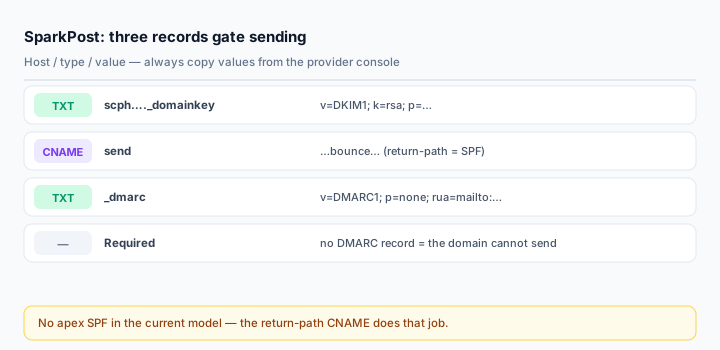
SparkPost — now part of Bird — changed its domain verification model, and a lot of published guides still describe the old one. The current requirement is three records, and SPF at your apex is not one of them. That single fact explains most of the "SPF is unverified" tickets people open after following an outdated tutorial.
Get the model right and the setup is fifteen minutes. Get it wrong and you spend a day chasing a record the dashboard is not even asking for.
What you need
- A SparkPost / Bird account with the sending domain added under Domains.
- DNS write access for the sending domain.
- A DMARC record — SparkPost now gates sending on it. A domain without DMARC cannot send, full stop.
- Decision on region: US (
sparkpostmail.com) and EU (eu.sparkpostmail.com) are separate accounts with separate records.
The three records that gate sending
Open the domain detail page in the app and it lists the full set with copyable host and value fields. Structurally it is:
DKIM (TXT)          <selector>._domainkey.example.com    v=DKIM1; k=rsa; p=...
Return-path (CNAME) send.example.com                      <region target>.bounce...
DMARC (TXT)         _dmarc.example.com                    v=DMARC1; p=none; rua=...
Optional:
Tracking (CNAME)    links.example.com                     <region>.links...
The DKIM selector is unique per organisation, typically scph plus four digits. Because Bird generates the key pair and publishes the public half under your own subdomain, no other customer's signature can be mistaken for yours.
Step 1: DKIM
Type: TXT
Host: scph0421._domainkey
Value: v=DKIM1; k=rsa; p=MIIBIjANBgkqhkiG9w0BAQEFAAOCAQ8A...
Copy host and value from the dashboard. Bird detects your DNS provider and formats the value the way that provider expects, including splitting a long TXT string into quoted segments where the provider requires it. Paste what you are given rather than reconstructing it.
If the key is longer than your panel accepts in one field, the fix is to split into quoted chunks inside one record — never two records. A second TXT at the same host breaks the lookup.
Step 2: The return-path CNAME is your SPF
This is the part that confuses people who learned SparkPost before 2024. The return-path record sets your envelope-from (bounce) domain, and pointing it at SparkPost is what gives you SPF alignment — receivers evaluate SPF against the envelope domain, which now resolves to SparkPost's bounce infrastructure.
Type: CNAME
Host: send.example.com
Target: <from dashboard, region-specific>
The host defaults to send. under your sending domain but can be changed per workspace. The target depends on your region, so copy it.
Consequence: you do not need include:sparkpostmail.com in your apex SPF any more. If you already have one from a legacy setup, it does no harm but it consumes a lookup for nothing. Removing it is optional; adding a second SPF record is not.
Where the return-path CNAME is genuinely better: SPF at the apex authorises the whole domain, so a shared-relay failure affects every sender you have. A delegated bounce domain scopes the blast radius and lets SparkPost rotate its sending infrastructure without a DNS change on your side.
Step 3: DMARC
SparkPost requires a valid DMARC record before a domain can send, and verifies it by resolving your DNS. A record on the domain itself or inherited from a parent both count.
_dmarc.example.com TXT v=DMARC1; p=none; rua=mailto:dmarc@example.com; fo=1The dashboard may suggest routing rua to a SparkPost address so their tooling can summarise reports. That is convenient, but you lose detail on which IP failed. If you want both, publish a comma-separated list:
v=DMARC1; p=none; rua=mailto:dmarc@example.com,mailto:aggregate@example.net; fo=1Move to quarantine and then reject once reports are clean. Read them with the DMARC Report Analyzer.
Step 4: Tracking CNAME (optional)
This one does not gate sending — a domain with valid DKIM, return-path and DMARC can send without it. What it gates is branded click and open tracking: with the record, links in your mail are rewritten to links.yourdomain.com instead of a generic provider host, which keeps link reputation attached to your brand.
On Cloudflare, all CNAMEs here must be DNS only. A proxied tracking CNAME will not serve the tracking endpoint and click tracking breaks.
Step 5: Verify
SparkPost re-checks automatically until records resolve, usually within minutes of propagation. You can also trigger a verify call.
dig TXT scph0421._domainkey.example.com +short
dig CNAME send.example.com +short
dig TXT _dmarc.example.com +short
Then send a real message and read the headers:
spf=pass smtp.mailfrom=send.example.com
dkim=pass header.d=example.com header.s=scph0421
dmarc=pass header.from=example.com
Note smtp.mailfrom pointing at your send. subdomain — that is the return-path CNAME doing its job. If it instead shows a SparkPost domain, your bounce domain is not configured and SPF alignment is not happening.
Common mistakes
- Looking for an SPF record to add. In the current model there is none at the apex.
- Sending without DMARC. The domain will not send at all.
- Copying a US return-path target into an EU account. Separate regions, separate targets.
- Proxying the CNAMEs on Cloudflare.
- Publishing the DKIM value as two records instead of one record with two quoted strings.
Frequently asked questions
Do I still need include:sparkpostmail.com?
Not for new setups. The return-path CNAME handles SPF alignment on a delegated subdomain, which is the better pattern. Legacy records can stay; just do not add a second v=spf1.
Can I use my apex as the sending domain?
Yes, but then you must add a custom bounce domain — the return-path CNAME needs a host, and putting it on the apex conflicts with your mailbox MX and SPF. Subdomain sending is cleaner on every axis.
Why does DKIM verify but DMARC still fail?
Alignment. Check that the d= in the DKIM signature matches your From domain exactly, and that the return-path host is under your domain. A d= of a shared provider domain passes DKIM and fails DMARC.
Related Tools
Need Help?
Our tools are designed to be intuitive, but if you need assistance, we're here to help.
About Our Tools
Professional-grade email and DNS diagnostic tools trusted by IT professionals worldwide.