
263 Enterprise Mail: MX, SPF, DKIM & DMARC Setup
Configure 263 Enterprise Mail on a custom domain: mxw.263.net at priority 5, mx.263.net at 10, the spf.263.net include, DKIM generated in the admin console, and DMARC reporting.
Aliyun Mail & DirectMail: DKIM, SPF & DMARC Setup
Step-by-step Aliyun DirectMail sender domain verification: the six DNS records, the SPF include values, region-based DKIM selectors and DMARC publishing.
Alibaba Mail (Alimail) SPF, DKIM & DMARC Setup Guide
Configure Alibaba Mail / Aliyun Enterprise Mail on your own domain: mx1-mx3.qiye.aliyun.com, the spf.qiye.aliyun.com include, default._domainkey DKIM and a DMARC record.
Huawei Cloud Enterprise Mail: MX, SPF & DKIM Setup
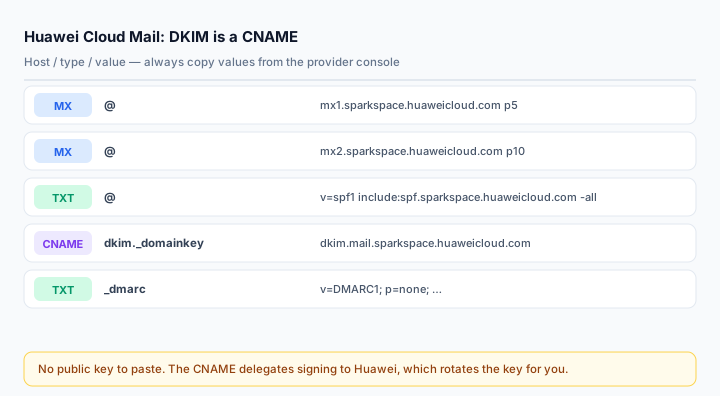
Huawei Cloud Enterprise Mail (华为云企业邮箱, internal codename KooMail) is common in organisations that already run on Huawei Cloud infrastructure. Its DNS set is small and unusually clean: two MX records, one SPF TXT, and a DKIM CNAME rather than a raw public key — the provider holds the key and rotates it for you.
That CNAME detail is where most third-party guides go wrong. They tell you to publish a TXT record at dkim._domainkey, which is not what Huawei asks for and will not verify.
What you need
- A Huawei Cloud account with the Enterprise Mail service enabled, and administrator rights in the mail console.
- The domain added under 域名管理. Huawei offers two onboarding modes: full send/receive setup, or "verify ownership only" — the second one only allows internal mail between your own accounts until you publish the MX records, so do not stop there by accident.
- DNS access at the authoritative host. If the domain is registered through Huawei Cloud, the DNS console is in the same account.
- Any other senders that use the domain, ready to merge into one SPF string.
Step 1: MX records
@   MX   5    mx1.sparkspace.huaweicloud.com
@   MX   10   mx2.sparkspace.huaweicloud.com
Two hosts, priorities 5 and 10. Delete competing MX records first — if the console shows an existing MX entry it will warn about conflict, and leaving both means mail is delivered unpredictably between the old and new provider.
Some DNS panels store MX targets with a trailing dot (mx1.sparkspace.huaweicloud.com.). Both forms are correct DNS; what breaks is a panel that appends your own domain to the value, producing mx1.sparkspace.huaweicloud.com.yourdomain.com. Verify with dig MX after saving rather than trusting the dashboard.
Step 2: SPF
v=spf1 include:spf.sparkspace.huaweicloud.com -allHuawei documents -all (hard fail). It is the right end state for a domain where the mailbox is the only sender, but it is unforgiving during rollout: a forgotten website form or an old scanner will have its mail rejected at the recipient, with no bounce delivered back to you.
If the inventory is not complete, publish soft fail and tighten once DMARC reports are clean:
v=spf1 include:spf.sparkspace.huaweicloud.com ~allMerge additional senders rather than adding a second record. Two v=spf1 TXT records on one domain is a permanent error:
v=spf1 include:spf.sparkspace.huaweicloud.com include:_spf.google.com ~allStep 3: DKIM — it is a CNAME, not a TXT key
dkim._domainkey CNAME dkim.mail.sparkspace.huaweicloud.comThat is the whole record. No key material, no 400-character string to split, no chunking problems. Huawei signs with a key it manages and publishes the public half at the target hostname.
Two practical consequences:
- Do not add a TXT record at the same host. A CNAME cannot coexist with any other record at the same name. If a previous provider left a TXT at
dkim._domainkey, delete it before creating the CNAME — otherwise the panel either refuses the record or serves a broken answer. - Do not proxy it. On Cloudflare, the record must be set to DNS only (grey cloud). A proxied CNAME resolves to a Cloudflare edge address and DKIM verification fails.
Verify the delegation resolves to Huawei's zone:
dig CNAME dkim._domainkey.yourdomain.com +short
dig TXT dkim._domainkey.yourdomain.com +short
The second query should return a v=DKIM1; k=rsa; p=... value even though you never published a TXT — that is the CNAME being followed. If it returns nothing, the target hostname is wrong for your region or the record type is not actually CNAME.
Step 4: DMARC
Huawei's console may offer a suggested policy of p=quarantine. Start lower, because a quarantine policy on a domain you have not audited will eat legitimate mail:
v=DMARC1; p=none; rua=mailto:dmarc@yourdomain.com; fo=1Run it for two weeks, read the aggregate reports with the DMARC Report Analyzer, then move to p=quarantine and finally p=reject. If you also route mail through Huawei's own anti-spoofing features, make sure only one _dmarc TXT exists — duplicate DMARC records are ignored entirely, which is worse than a weak policy.
Step 5: Verify end to end
Send from a Huawei mailbox to Gmail and read the original headers:
spf=pass (spf.sparkspace.huaweicloud.com designates <IP> as permitted)
dkim=pass header.d=yourdomain.com
dmarc=pass (p=NONE) header.from=yourdomain.com
If DKIM passes with d=sparkspace.huaweicloud.com, the message is signed by Huawei's domain rather than yours — the CNAME is missing or does not resolve. Fix that before touching DMARC, since alignment relies on the d= value matching your From domain.
Use the MX Lookup, SPF Checker and DKIM Checker for the published side.
Common mistakes
- Publishing a TXT at
dkim._domainkeybecause a blog said so. Huawei uses a CNAME. - Proxying the DKIM CNAME on Cloudflare. It must be DNS only.
- Choosing "verify ownership only" and assuming the setup is finished — the domain then only supports internal mail.
- Leaving one old MX record, so half your inbound mail still lands in the previous mailbox.
- Hard fail on day one and losing enquiry mail from a website form nobody remembered.
Frequently asked questions
Does Huawei rotate the DKIM key without telling me?
Because the record is a CNAME to Huawei's zone, key rotation happens on their side and requires no DNS change from you. That is the main operational advantage of CNAME-based DKIM over a raw TXT key.
Can I host mail on Huawei Cloud and send transactional mail through a separate ESP?
Yes, and you should separate them: keep the mailbox on the apex, put the ESP's sending domain on a subdomain such as mail.yourdomain.com, with its own SPF and DKIM. Marketing reputation then cannot damage the domain your staff use for correspondence.
Why does my SPF show a lookup error?
Either there are two records, or the total lookup count exceeded 10. Check both with the SPF Checker; flattening low-value includes is usually the fix.
Related Tools
Need Help?
Our tools are designed to be intuitive, but if you need assistance, we're here to help.
About Our Tools
Professional-grade email and DNS diagnostic tools trusted by IT professionals worldwide.