
263 Enterprise Mail: MX, SPF, DKIM & DMARC Setup
Configure 263 Enterprise Mail on a custom domain: mxw.263.net at priority 5, mx.263.net at 10, the spf.263.net include, DKIM generated in the admin console, and DMARC reporting.
Aliyun Mail & DirectMail: DKIM, SPF & DMARC Setup
Step-by-step Aliyun DirectMail sender domain verification: the six DNS records, the SPF include values, region-based DKIM selectors and DMARC publishing.
Alibaba Mail (Alimail) SPF, DKIM & DMARC Setup Guide
Configure Alibaba Mail / Aliyun Enterprise Mail on your own domain: mx1-mx3.qiye.aliyun.com, the spf.qiye.aliyun.com include, default._domainkey DKIM and a DMARC record.
Coremail SPF, DKIM & DMARC Setup (Self-Hosted & Cloud)
Coremail is not a single service. The same codebase ships as a self-hosted mail system (XT6), a dedicated tenant (专享版), a public cloud mailbox (iCoremail, and the older Shangyi brand), and the engine behind several university and carrier mail platforms. That is why two Coremail customers can follow the same tutorial and end up with completely different records — and why "the Coremail SPF record" does not exist as a universal value.
What follows separates the cases. Pick the one that matches your deployment before publishing anything.
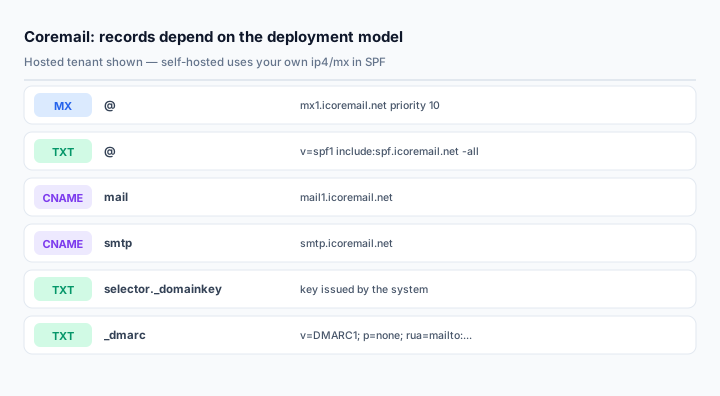
Case 1: hosted Coremail / iCoremail tenants
If Coremail runs the mailboxes for you, authorization is a single include, documented in their own support center:
@ TXT v=spf1 include:spf.icoremail.net -allPublish it as one record. If the domain also sends through an ESP or a CRM, merge rather than adding a second policy:
@ TXT v=spf1 include:spf.icoremail.net include:spf.other-provider.com -allFor a dedicated tenant, MX and CNAME values come from the provisioning document. A typical dedicated setup is:
@                MX     10    mx1.icoremail.net.
mail             CNAME        mail1.icoremail.net
pop              CNAME        pop.icoremail.net
smtp             CNAME        smtp.icoremail.net
imap             CNAME        imap.icoremail.net
Note the trailing dot after mx1.icoremail.net. in Coremail's own dedicated-edition guide. In DNS zone syntax that dot means "fully qualified"; some panels store it literally and then fail to resolve the MX. If your panel does not accept a trailing dot, drop it — the panel appends the zone automatically.
One more detail from the same guide: for a tenant without an ICP filing, the webmail CNAME points at gzwp.icoremail.net instead of mail1.icoremail.net. Using the wrong one gives you a login page that loads and then refuses to authenticate.
Case 2: self-hosted Coremail XT6
A self-hosted system has no vendor include to lean on. You authorize your own egress addresses. Coremail's SPF guidance lists the four valid patterns:
v=spf1 a:mail.yourdomain.com -all
v=spf1 mx -all
v=spf1 ip4:203.0.113.10 ip4:198.51.100.0/28 -all
v=spf1 mx ip4:203.0.113.10 include:spf.icoremail.net -all
Choose based on how stable your outbound path is:
mxis the simplest and works when the same hosts that receive mail also send it. It costs one DNS lookup per MX record.a:is useful when outbound goes through a dedicated smarthost with its own A record.ip4:is the most precise and the most fragile. Every new egress IP — a second line, a failover link, a new NAT pool — must be added by hand.- Mixed records are allowed, but keep the 10-DNS-lookup limit in mind. Each
mxand eachincludecan cost multiple lookups.
A very common failure in Chinese enterprises: outbound mail leaves through two ISP links, SPF lists only the primary IP, and half the messages fail SPF on days when the backup link is active. If you cannot enumerate the egress IPs reliably, put Coremail behind a fixed smarthost and authorize that host with a:.
Case 3: DKIM
Coremail supports DKIM on all deployment models, but key handling differs:
- Hosted and dedicated: the key pair is issued by Coremail support or generated in the tenant console. You publish the public key; they hold the private key and sign outbound mail.
- Self-hosted: generate the pair on the system, enable signing in the admin console, and publish the public key yourself. The selector is whatever the system assigns — read it from the console rather than assuming
default.
The published record is a standard TXT:
<selector>._domainkey TXT v=DKIM1; k=rsa; p=MIIBIjANBg...Three rules that save hours of debugging:
- Copy the key with no whitespace. Long keys pasted through a chat window are the single most common cause of "record exists but signature fails".
- Publish at the exact host the console shows. If the console gives a fully qualified name, do not let the panel append the zone a second time.
- Enable signing as a separate step. On self-hosted systems the DNS record and the signing switch are independent; a valid record with signing off produces zero DKIM-Signature headers.
Case 4: DMARC
Coremail publishes a template with their own reporting addresses:
_dmarc TXT v=DMARC1; p=none; fo=1; ruf=mailto:dmarc@icoremail.cn; rua=mailto:dmarc_report@icoremail.cnTheir support team does analyze reports sent to those addresses, which is genuinely useful for a small IT team. But for anything with compliance requirements, replace them with your own mailbox:
_dmarc TXT v=DMARC1; p=none; fo=1; rua=mailto:dmarc@yourdomain.comStart at p=none. Self-hosted systems in particular tend to have unauthenticated senders you have forgotten about: scanners, backup software, monitoring, the ERP's notification service. Moving to p=reject before those are known will break them silently.
Verifying a self-hosted deployment
dig +short TXT yourdomain.com
dig +short MX yourdomain.com
dig +short TXT <selector>._domainkey.yourdomain.com
dig +short TXT _dmarc.yourdomain.com
Then send a message from the system to a Gmail address. Read the full Authentication-Results header, not just the summary in the UI. If SPF passes and DKIM fails, check the selector first, then the key. If both pass and DMARC fails, the From domain and the signing domain are not aligned — common when the mail system rewrites the sender for a subdomain.
For self-hosted systems it is also worth checking what the outbound IP actually resolves to. SPF validates the IP, not the hostname, but PTR and HELO mismatches still influence reputation scoring. The email health check covers the combined view.
Common mistakes
- Using
include:icoremail.net. The authorized sender isspf.icoremail.net; the bare domain authorizes nothing. - Copying a dedicated-tenant MX with the trailing dot into a panel that does not accept it. The record saves and never resolves.
- Self-hosted SPF listing one of two egress links. Half your mail fails on failover days.
- Publishing DKIM without enabling signing in the admin console.
- Keeping Coremail's DMARC reporting addresses in a regulated environment.
- Making the apex a CNAME. Coremail's own guide warns that a CNAME at the root breaks MX resolution.
Frequently asked questions
Which model am I on?
Check who holds the private DKIM key and who runs the inbound gateways. If mail arrives at mx1.icoremail.net, it is hosted or dedicated. If it arrives at your own hostname with your own IP, it is self-hosted, even if the software is Coremail.
Can I use a 2048-bit DKIM key on an old Coremail build?
XT6 and current cloud tenants support it. Very old builds may only issue 1024-bit keys; in that case ask support about upgrading rather than publishing a key the system cannot sign with.
Does Coremail sign with a selector per domain or per tenant?
Per domain in most configurations, but the value is assigned by the system. Always read it from the console — this is why copying a selector from another Coremail customer fails.
Why does the guidance mention an A record pointing at 127.0.0.1?
Coremail's dedicated-edition guide suggests it for the case where the apex has no A record at all. An MX lookup requires the name to exist in DNS; a placeholder A record at loopback satisfies that without directing web traffic anywhere. Do not add it if the apex already has a real A or AAAA record.
Related Tools
Need Help?
Our tools are designed to be intuitive, but if you need assistance, we're here to help.
About Our Tools
Professional-grade email and DNS diagnostic tools trusted by IT professionals worldwide.