
263 Enterprise Mail: MX, SPF, DKIM & DMARC Setup
Configure 263 Enterprise Mail on a custom domain: mxw.263.net at priority 5, mx.263.net at 10, the spf.263.net include, DKIM generated in the admin console, and DMARC reporting.
Aliyun Mail & DirectMail: DKIM, SPF & DMARC Setup
Step-by-step Aliyun DirectMail sender domain verification: the six DNS records, the SPF include values, region-based DKIM selectors and DMARC publishing.
Alibaba Mail (Alimail) SPF, DKIM & DMARC Setup Guide
Configure Alibaba Mail / Aliyun Enterprise Mail on your own domain: mx1-mx3.qiye.aliyun.com, the spf.qiye.aliyun.com include, default._domainkey DKIM and a DMARC record.
iCloud+ Custom Email Domain: MX, SPF & DKIM Setup
iCloud+ includes a custom email domain feature that most people never notice: with any paid iCloud plan you can host up to five domains and use name@yourdomain.com inside Apple Mail, on every device that is signed into the account. It is not a business mail platform — there are no shared mailboxes, no admin console, and email addresses are tied to Apple Accounts — but for a freelancer, a small studio, or a family domain it removes a subscription entirely.
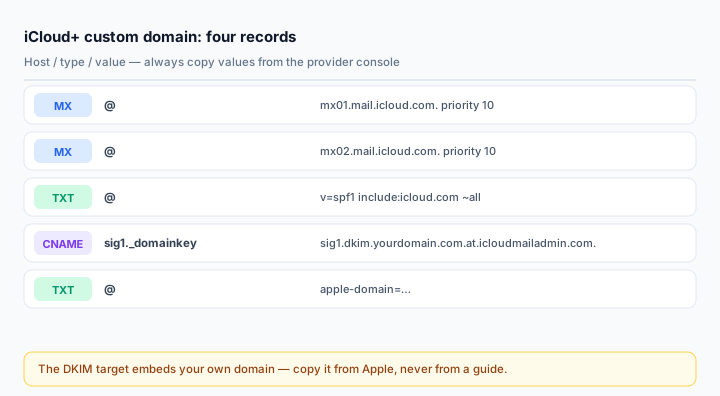
The DNS set is four records and, unlike most providers, the DKIM record is a CNAME that contains your domain name inside the target. That detail is where copy-paste goes wrong.
What you need
- An active iCloud+ plan. The free 5 GB tier does not support custom domains.
- Your domain at a registrar whose DNS you can edit. If the domain is locked at the registrar, the setup will refuse to verify.
- Existing mail archived or migrated: once MX moves, new mail only reaches iCloud.
- Decide whether the domain is for you alone or shared with Family Sharing members — the scope is chosen during setup and determines who can create addresses.
Step 1: Start the flow and get your values
Sign in at iCloud.com, open Account Settings, scroll to Custom Email Domain and click Manage. Choose Only You or You and Other People, enter the domain, then create the first address.
Apple then shows the records for your domain. Two of them are static and appear in every guide; two are specific to your account (the verification token and the DKIM target). Copy all four from the screen — do not reconstruct the DKIM target from a template.
Step 2: MX records
@   MX   10   mx01.mail.icloud.com.
@   MX   10   mx02.mail.icloud.com.
Both records use priority 10 — Apple treats them as equals rather than a primary and a fallback. Delete any existing MX records first; two competing providers at the same priority produce delivery that appears random.
Note the trailing dot. Apple prints the targets with one, and it is the correct fully-qualified form. Most panels accept it, some strip it, and a few will double-append your domain if you omit it. Check with dig MX right after saving.
Step 3: SPF
v=spf1 include:icloud.com ~allIf you already have an SPF record, add include:icloud.com to it rather than creating a second TXT record. Two v=spf1 records make SPF fail entirely, and the failure is silent — mail still sends, it just stops being authenticated.
v=spf1 include:icloud.com include:_spf.google.com ~allApple's documentation notes that if a registrar does not support quotes or trailing dots in record values, enter the value without them. Quotes in a TXT value are a transport-level detail; a panel that stores them literally turns your policy into a string that does not begin with v=spf1.
Step 4: DKIM CNAME
sig1._domainkey CNAME sig1.dkim.yourdomain.com.at.icloudmailadmin.com.The host is always sig1._domainkey. The target embeds your own domain in the middle — that is Apple's per-domain signing endpoint, and it is why you cannot copy the value from someone else's tutorial. The exact string is generated when you add the domain and shown on the setup screen.
Three things that break this record:
- The host field getting the bare selector only. Some panels require
sig1._domainkey, others append the zone automatically. If the panel auto-appends, entering the full name createssig1._domainkey.yourdomain.com.yourdomain.comand nothing resolves. - A trailing dot the panel rejects. Remove it if the form refuses the value; the record still resolves.
- Proxy mode. On Cloudflare it must be DNS only. A proxied CNAME never returns Apple's signing host.
Confirm the delegation, not just the record's existence:
dig CNAME sig1._domainkey.yourdomain.com +short
dig TXT sig1._domainkey.yourdomain.com +short
The second query should return a v=DKIM1; k=rsa; p=... value reached through the CNAME.
Step 5: Verification TXT
@ TXT apple-domain=xxxxxxxxxxxxxxxxThis proves ownership. It is a plain TXT at the root, shown in the setup flow. Once Apple confirms the domain, the record can stay — it does no harm and is needed again if you ever re-verify.
Set TTL to 3600 (one hour) for all four records while setting up. Lower TTLs make a wrong value correctable in minutes instead of a day.
Step 6: DMARC
Apple does not require it, but without one your domain stays spoofable and Gmail will treat anything bulk-shaped with suspicion:
v=DMARC1; p=none; rua=mailto:dmarc@yourdomain.com; fo=1Two weeks of reports, then quarantine, then reject. Read them with the DMARC Report Analyzer. Note that iCloud+ custom domains have no bulk sending path at all — if you later add a newsletter tool, its include goes into the same SPF and its DKIM selector gets its own record.
Step 7: Verify
Send from the custom address to a Gmail account and inspect the original:
spf=pass (icloud.com designates <IP> as permitted)
dkim=pass header.d=yourdomain.com
dmarc=pass (p=NONE) header.from=yourdomain.com
A DKIM pass with d=icloud.com means Apple signed with its own domain — the CNAME is missing or misdirected. Check with the DKIM Checker using selector sig1.
Common mistakes
- Copying a DKIM target from a guide. It contains your domain; only Apple's screen has the right one.
- Double-appending the domain in the CNAME host.
- Leaving old MX records at the same priority.
- Assuming family members get unlimited addresses. Three per person per domain, and the domain owner controls the domain.
- Expecting SMTP relay for applications. iCloud Mail is a mailbox; use
smtp.mail.me.comwith an app-specific password for personal scripts only, never for bulk.
Frequently asked questions
Can I use iCloud+ mail for a business domain?
For a very small business, yes. The limits appear quickly: no shared mailboxes, no delegation, no admin console, no audit log, and addresses are personal Apple Accounts. Once you need any of those, move to a proper mailbox provider and keep iCloud as a personal address.
What happens to mail sent to addresses I never created?
It bounces. There is a catch-all toggle in the domain settings — enable it during migration so forgotten addresses keep working.
Does the DKIM CNAME need all three of Apple's records?
No. iCloud uses a single sig1 selector. That is one of the ways its setup is simpler than Proton's three-selector scheme.
Related Tools
Need Help?
Our tools are designed to be intuitive, but if you need assistance, we're here to help.
About Our Tools
Professional-grade email and DNS diagnostic tools trusted by IT professionals worldwide.